
P2M or UPI Intent URL Integration
PayU offers for WhatsApp Business enables your customers to make seamless payments for products & services directly from WhatsApp. Your customers can now sell and buy entirely within a WhatsApp conversation thread without having to open another app, visit a website, or make a payment by other means.
Customers can now access to a wide range of payment options, including UPI, cards, Net Banking, EMI, BNPL and International Payments.
This part of the documentation includes:
Value of completing the sales cycle inside WhatsApp and common use cases.
Conversion, payment modes, and what PayU brings to WhatsApp Commerce.
Try the native payments journey using the sample QR code.
WABA and PayU merchant account requirements before you integrate.
UPI Intent URL and P2M payment experiences with step-by-step accordions.
WhatsApp Business APIs, BSP enablement, and linking PayU with your WABA.
Partner Integration APIs for access token, checkout, UPI S2S, and refunds.
Why are native payments on WhatsApp important?
WhatsApp Business has proven to be an effective customer engagement channel for a wide range of business use cases. However, businesses have been unable to complete the sales cycle on the platform.
With PayU’s in-app payments on WhatsApp Business, businesses can now offer their customers a native payment experience inside WhatsApp. This opens up a range of commercial opportunities for businesses, including the following:
- Recover Abandoned Carts

- Upsell or Cross-sell with Offers & Coupons
- Convert Cash on Delivery orders to Pre-paid
How does PayU help your business?
Reduce drop-offs & improve conversion: With PayU’s in-app payments on WhatsApp Business, businesses can close the entire discovery-to-payment loop directly on a WhatsApp chat conversation, thereby reducing drop-offs.
Accept all payment modes: The frictionless checkout experience offered by PayU’s industry-leading technology, which includes 100+ payment methods, including EMI and pay-later options, saved cards, and native OTP, adds up to a great purchase experience for customers.
Experience Native WhatsApp Payments
Experience the native WhatsApp payments journey yourself by scanning the below QR code.

Pre-requisites
You must ensure that you have the following:
- WhatsApp Business Account
- Active PayU Merchant Account
Customer Journey
Payment Experience with UPI Intent URL
In a live integration, your backend creates the UPI Intent via PayU and sends POST /messages with type: order_details and payment_type: "upi" (per your programme spec).
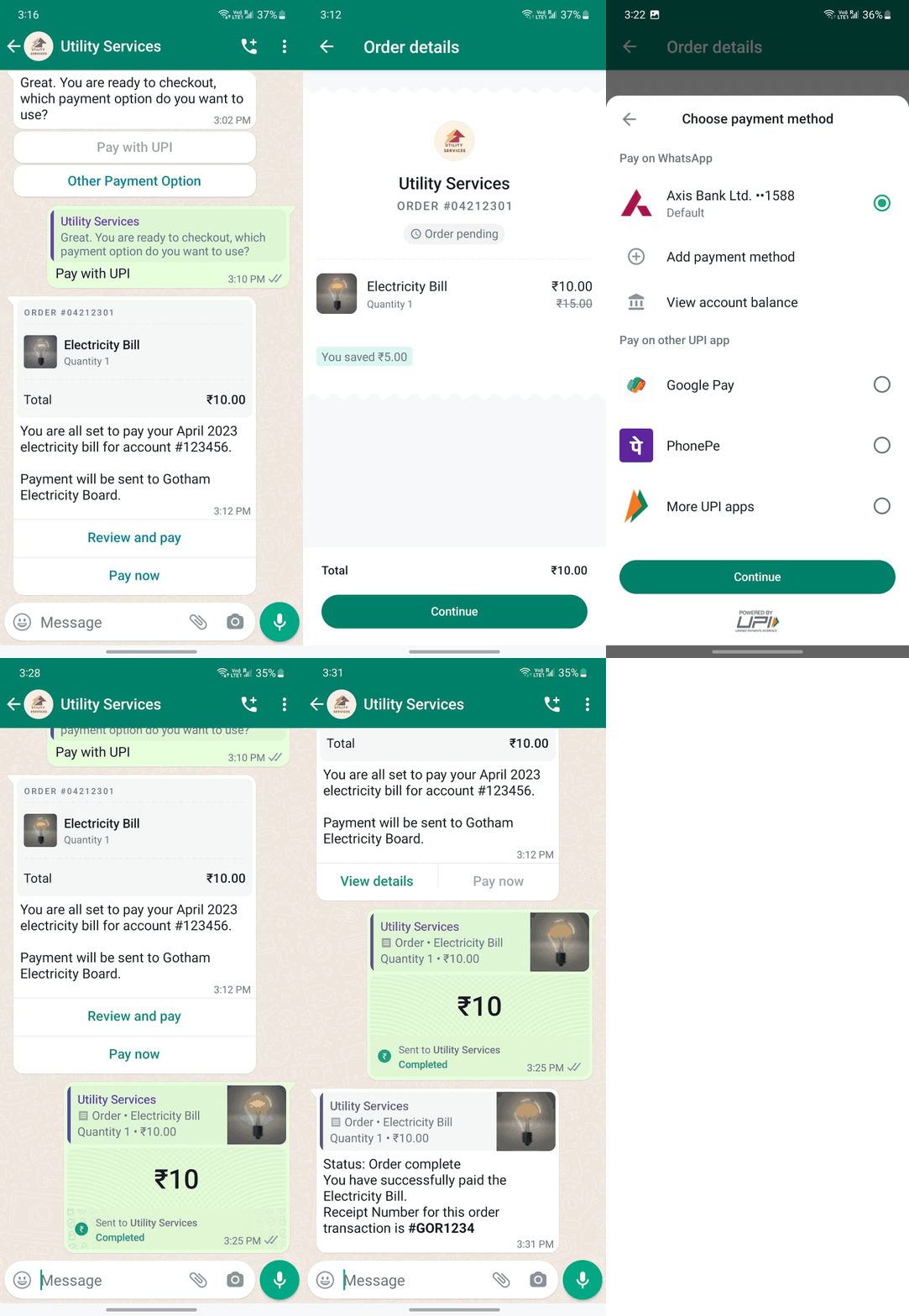
Step 1: Choose payment path and receive the order card
In the chat, the business asks how the customer wants to pay (for example Pay with UPI vs Other payment option). After the customer selects Pay with UPI, the business sends an order-style message: order reference, line item (for example Electricity bill), amount, short narrative, and actions such as Review and pay and Pay now.
Step 2: Review native order details (pending)
The customer opens the Order details view: merchant branding, ORDER reference, Order pending state, line items and pricing (including any discount), Total, and Continue to move toward payment.
Step 3: Choose UPI payment method
The Choose payment method sheet lists Pay on WhatsApp (linked bank as Default), options to Add payment method or View account balance, and Pay on other UPI app (for example Google Pay, PhonePe, More UPI apps). The customer selects an option and taps Continue (POWERED BY UPI).
Step 4: In-chat payment confirmation
In the thread, the customer sees the order summary alongside a completed payment bubble (amount, Sent to the business, Completed with read receipts). This corresponds to a successful UPI authorisation after the customer confirms on their bank or TPAP flow.
Step 5: Receipt and order complete
The business sends a closing message: Order complete, paid line item, and a receipt (or reference) number for the customer’s records. Your systems should already have received the PayU PG webhook for reconciliation.
P2M / PG Deep Integration on WhatsApp Flow
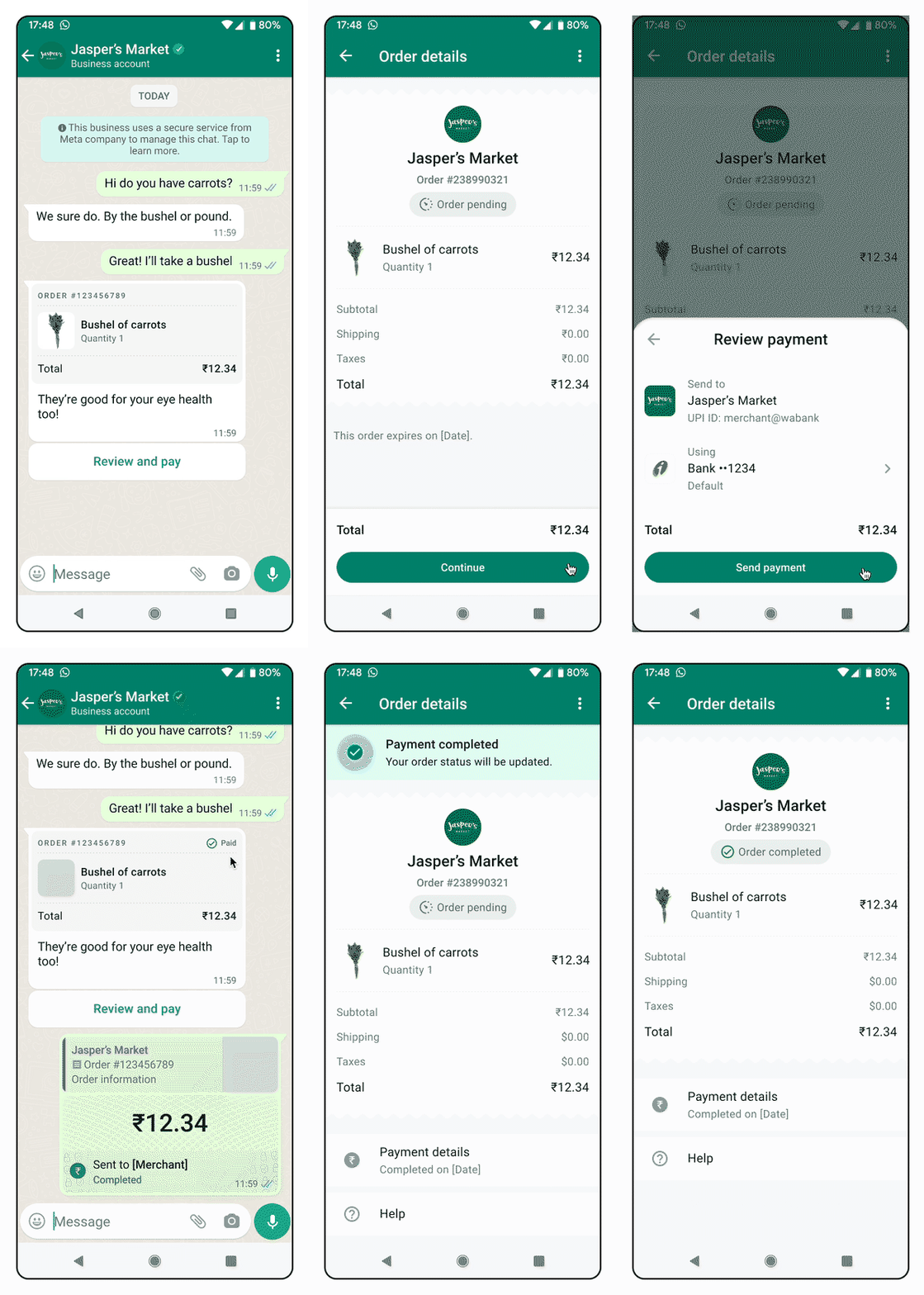
Step 1: Business sends catalogue or order in WhatsApp
The merchant (or automation) sends a structured order or catalogue message in the conversation—line items, amounts, and context the customer needs before paying. This is typically an order_details-style interactive message initiated over the WhatsApp Cloud API once your PG and Meta payment_configuration are in place.
Step 2: Customer taps Review & Pay in the chat
From the order bubble or card, the customer taps Review & Pay (or the equivalent CTA Meta renders for your template). The UI stays inside WhatsApp; there is no hand-off to an external merchant web checkout for the core native flow.
Step 3: Native payment sheet opens
WhatsApp opens the native payment sheet so the customer can choose UPI (including linked bank / TPAP where offered), cards, net banking, wallets, and EMI when your programme supports it.
Step 4: Customer completes payment without leaving WhatsApp
The customer enters OTP, UPI PIN, or other authentication required by the selected method. Authorisation completes without leaving WhatsApp for the native P2M path (contrast with EPL, where checkout opens in a browser, and contrast with UPI Intent–only flows that lean on UPI apps).
Step 5: Instant confirmation and order update in the chat
On success, the customer sees payment confirmation and order status updates in the same thread (for example paid / processing / complete, depending on your implementation). Your backend should consume WhatsApp payment / order webhooks where configured, and continue to handle the PayU PG webhook for reconciliation—PG Deep Integration uses both channels versus EPL or UPI Intent alone.
Steps to Integrate
- Integrate with WhatsApp Business APIs directly or via a BSP (Business Service Provider)
- Link PayU with WhatsApp Business Account
WhatsApp Integration APIs
The Partner Integration APIs are used for WhatsApp integration. The Partner Integration APIs are:
| API | Description |
|---|---|
| Getting Access Token | Obtains the OAuth access token used for Partner Integration payment APIs. After PayU returns an auth_code on your redirect URI, validate it to receive an access_token (and refresh_token); use that token instead of merchant key/salt on subsequent partner calls. |
| Hosted Checkout Integration - Partner Integration | Initiates a hosted checkout payment on behalf of a referred merchant: your server posts the transaction to PayU, the customer completes payment on PayU’s payment page, you validate the redirect response, verify the transaction, and receive a server-to-server callback with the final status. |
| UPI S2S Integration for Partners | Runs server-to-server UPI Intent for partners (including WhatsApp flows): initiate the payment with the partner access token, invoke UPI Intent on the customer’s device, verify payment, and handle PayU’s S2S callback—without using merchant key/salt for those calls. |
| Refund Transaction API – Partner Integration | Lets a partner cancel a transaction still in auth state or refund a captured transaction for a merchant, using the partner authentication model and the merchant/refund identifiers required in the API. |
| Partner Refund Status API | Lets a partner look up the status of a refund (by merchant and refund identifiers), using a Bearer token in the request header, so you can reconcile refunds initiated via the Partner Refund API. |
Updated 4 months ago
