
Virtual-Account Based Local Wire Transfers
Collect cross-border payments through Virtual Accounts (VA). Payers in India transfer INR via NEFT, RTGS, or IMPS. PayU confirms the credit, holds it until required trade data is submitted and approved, then settles to your offshore account in currency of choice.
Suited for: Global Payment Service Providers (PSPs) integrating via API.
Illustrative payment journey for PACB Virtual Account Collections.
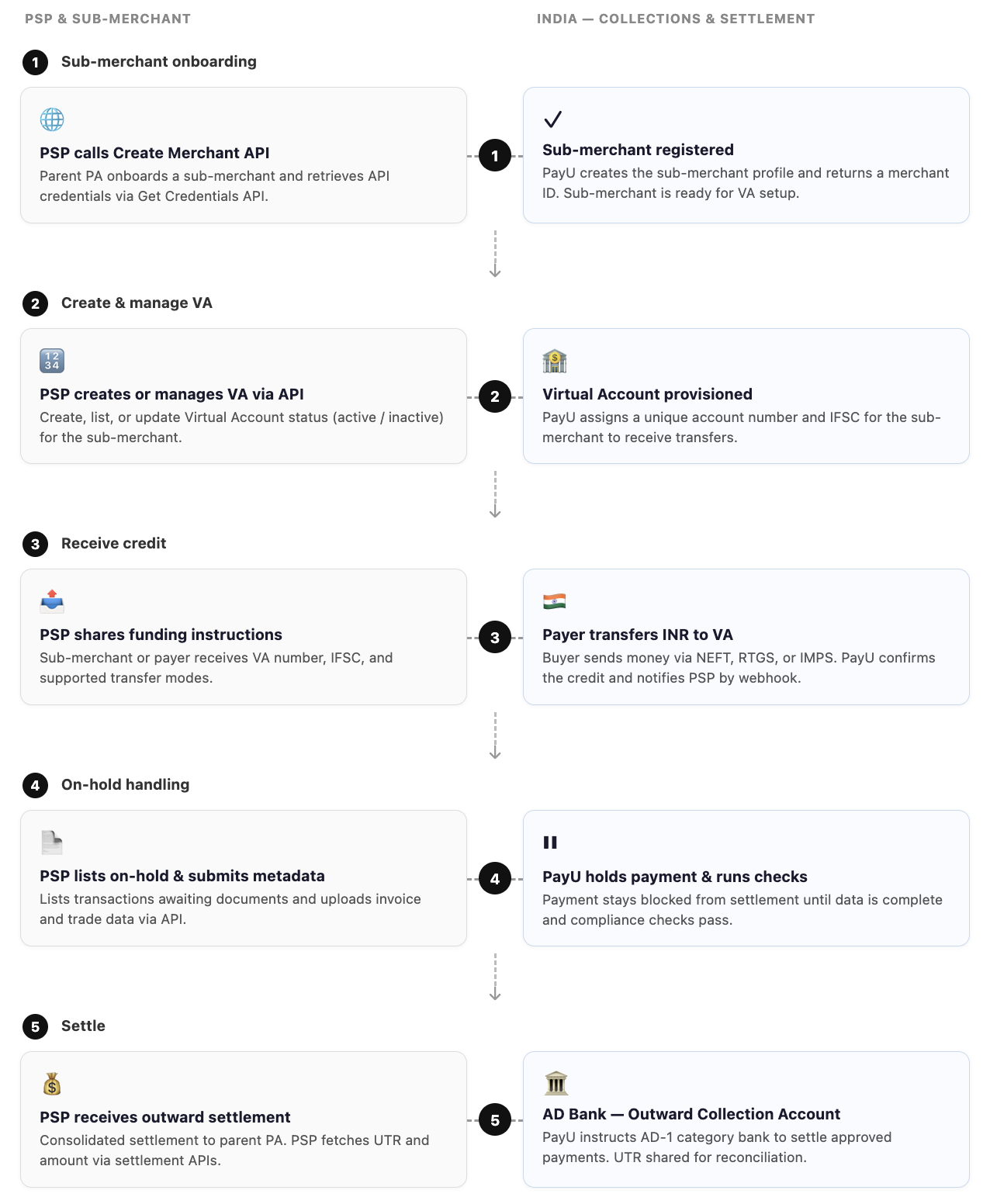
- Sub-merchant onboarding — Create sub-merchant and retrieve API credentials.
- Create & manage VA — Provision and manage Virtual Account via API.
- Receive credit — Payer transfers to VA; PayU confirms and notifies PSP.
- On-hold handling — PSP submits invoice and trade metadata; PayU runs checks.
- Settle — Approved payments settle to PSP via AD Bank with UTR.
PayU partners with an AD-1 category bank for outward settlement. Funds move to the Outward Collection Account (OCA) before settlement to the PSP, similar to the import collections workflow.
Integration Guide
| Section | Activity | API Document(s) |
|---|---|---|
| Sub-merchant onboarding | Create sub-merchant | Create Merchant API (International) |
| Update sub-merchant profile | Update Merchant API (International) | |
| Virtual Account (VA) Management | Create Virtual Account | Create Virtual Account |
| Disable Virtual Account | Deactivate Virtual Account | |
| Get List of VA per merchant | Get Virtual Accounts per MID | |
| Payments | Payment webhooks & | Payment Webhooks |
| Transaction Status Check API | Verify Payment API | |
| Get all transactions (per MID) | Get Transactions API | |
| On hold transactions | Get & Update On-Hold transactions | Get & Update On-hold API |
| Settlement | Get Settlement Status | Get Settlement Details API |
| Refunds | Initiate refund by merchant txn ID / PayU | Refund APIs (Initiate, Check Status) |
| Get Refund Status API | Refund APIs (Initiate, Check Status) |
Key Behaviours
- After credit, payment is on hold until metadata is complete and checks pass
- Transaction limit at INR 25,00,000, any transaction on the virtual account higher than this amount will be rejected.
- Onboarding uses PSP's credentials; payments use sub-merchant credentials
Getting Started
- Obtain parent PA credentials from PayU.
- Integrate Create Merchant and Get Credentials for a test sub-merchant.
- Register webhook URLs.
- Test: create sub-merchant → receive credit → submit metadata → fetch settlement details.
For issues, share merchant ID, transaction ID, and webhook eventId with your PayU integration contact or [email protected]
Updated 4 months ago
Did this page help you?
