
Pre-Authorize Payments
What is Auth & Capture
Auth and Capture is a two-step payment processing method that provides greater control and flexibility over transactions:
- Authorization (Auth): Verifies the payment method is valid and reserves funds on the customer's account without immediately charging them
- Capture: Later transfers the reserved funds from the customer's account to the merchant's account, completing the transaction
PayU supports Auth and Capture on Credit Card and Debit Card payments.
PayU's offering
In a basic payment flow, the payable amount from your payment request is authorized and captured immediately during the transaction flow, but sometimes you may want to charge the customer a different amount or extend the period of authorization to capture the payment at later point in time.
PayU’s pre-authorization (also card authorization, authorization hold or Auth and Capture) product allows merchants two-step card payments so you can temporarily block some amount of funds when a customer places an order (authorization) and then capture the amount later. If the order canceled by the customer within a specific time frame (typically 5-7 days), then you can mark the transaction cancelled and the amount goes back to the consumer’s original payment source instantly.
Remember: PayU currently supports Pre-authorization (Auth and Capture) for Visa, Mastercard and Amex Credit Cards.
Before you begin:Register for a account with PayU before you start integration. For more information, refer to Register for a Merchant Account.
Integration guides
The following sections describe how to integrate pre-authorization (Auth and Capture) with PayU:
- Pre-Authorize Card Transactions
- UPI One-Time Mandate Integration
- S2S Pre-Authorize Payment
- Cancel a Pre-Authorized Payment
Features
- Assurance that held funds are maintained by the payer up to 7 days.
- No transaction cost (TDR) levied on the cancelled ordered.
- Improved Customer experience as cancelled amount is instantly credited to the payer’s source account.
- No chargeback liability until a capture of funds is made on the authorization request.
Workflow
The following flow diagrams illustrates the difference between collecting payment without and with Auth and Capture:
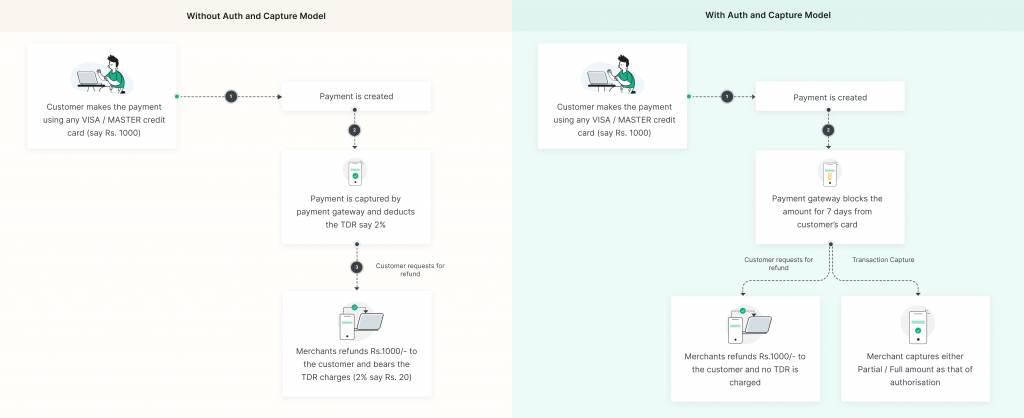
- Pre-authorization transaction checks the fund availability and holds the required funds on the payer’s card for up to 7 days.
- A capture request is used to debit the funds from the payer’s card.
- After an authorization has been made, you can capture either a partial amount (partial capture) or the full amount of the authorization.
- PayU provides Auto Capture feature by default on 7th day of authorization initiation If there is no request of capture/cancel from merchant. Merchant can opt in for Auto Cancel or set a different Auto capture time for their authorization requests.
- Cancel is only applicable to the Authorization requests and any Authorization which is captured can only be refunded.
- After the partial amount has been captured, the balance amount is cancelled immediately.
Use cases
There are several use cases for adjusting an authorisation. A few scenarios are:
Hospitality
- At the checkout page of the hotel’s website, the hotel pre-authorises payment of the rooms that the guest pre-booked.
- Before the arrival, the guests decides to cancel one of the pre-booked rooms. The hotel adjusts these expenses of their pre-authorized amount.
- When the guest checks out, the hotel captures the final adjusted amount using partial capture.
Prepaid Services
For example, a self drive car renting platform, the merchants often collect security deposits along side the variable expenses. In this case merchant does a pre-authorize of the payment with some extra margins. At the end of the trip, the merchant adjusts the authorised amount and does a partial capture or full capture based on the expenses incurred.
E-Commerce merchants
For example, a seller is running a promotional event, where a shopper pre-books a phone that will be released few days later. The phone seller pre-authorises the payment, but as they can only ship the product later, they need to extend the authorisation validity. This allows both merchants to capture the payment over an extended duration.
Updated 3 months ago
