
Apple Pay Integration
Apple Pay offers a fast, secure, and seamless payment experience across iOS and watchOS apps, as well as websites on Safari. With a simple Face ID, Touch ID, or a double-click on Apple Watch, users can instantly and securely share their payment, shipping, and contact details to complete transactions.
Before you begin:Register for a account with PayU before you start integration. Complete domain verification and Apple Pay setup, then contact your PayU Key Account Manager to activate Apple Pay on your account. For more information, refer to Register for a Merchant Account and Prerequisites and Set up for Apple Pay Integration.
Integration guides
The following sections describe how to integrate Apple Pay with PayU:
- Prerequisites and Set up for Apple Pay Integration
- PayU Hosted Checkout Integration
- Merchant Hosted Checkout Integration
- Merchant Hosted with Session Management Integration
- Apple Pay UI Seamless Integration
APIs mentioned without a linked reference page
| Mention | Context | Purpose |
|---|---|---|
Apple Pay Session Validation API (/seamless/Session) | Merchant Hosted with Session Management Integration, Apple Pay UI Seamless Integration | Validate the merchant session with Apple during onvalidatemerchant; PayU forwards the request to Apple and returns the merchant session object. Documented inline on integration pages; no ref: link is provided. |
Verification and post-payment APIs
| Name | Purpose |
|---|---|
| Webhooks | Alternative server-to-server verification when callbacks fail. Available via <Verify_Payment_Tabs /> on integration pages. |
Key Features
For users
| Feature | Description |
|---|---|
| One-Tap Checkout | Quick and secure purchases with biometric authentication (Face ID/Touch ID) |
| Privacy Protection | Card numbers are never stored on device or shared with merchants |
| Cross-Device Support | Works seamlessly across iPhone, iPad, Mac, and Apple Watch |
| No Additional Fees | Users are not charged any extra fees for using Apple Pay |
For merchants
| Feature | Description |
|---|---|
| Higher Conversion Rates | Simplified checkout reduces cart abandonment |
| Enhanced Security | Tokenized transactions reduce fraud risk |
| 3D Secure Compatible | Apple handles 3DS authentication with issuing bank |
| No Processing Fees | Apple does not charge merchants for Apple Pay transactions |
How Apple Pay works
- Card Tokenization: When a user adds a card to Apple Pay, the card number is replaced with a Device Account Number (DAN) - a unique token specific to that device.
- Secure Element Storage: The DAN is stored in the Secure Element, a dedicated chip on Apple devices that isolates payment information from the operating system.
- Dynamic Security Code: For each transaction, Apple Pay generates a one-time dynamic security code that validates the payment.
- Biometric Authentication: Users authenticate payments using Face ID, Touch ID, or device passcode.
- Network Processing: The tokenized payment is sent through the payment network, which de-tokenizes it and processes the transaction with the issuing bank.
Supported payment networks
- Visa
- Mastercard
- American Express
- Diners Club
- Discover (in supported regions)
Goals
| Goal | Description |
|---|---|
| Increase Conversion | Reduce checkout friction and cart abandonment |
| Enhance Security | Leverage tokenization and biometric authentication |
| Improve User Experience | Provide seamless, one-tap payment experience |
| Expand Payment Options | Offer modern digital wallet support for customers |
Apple Pay flow
High-level flow
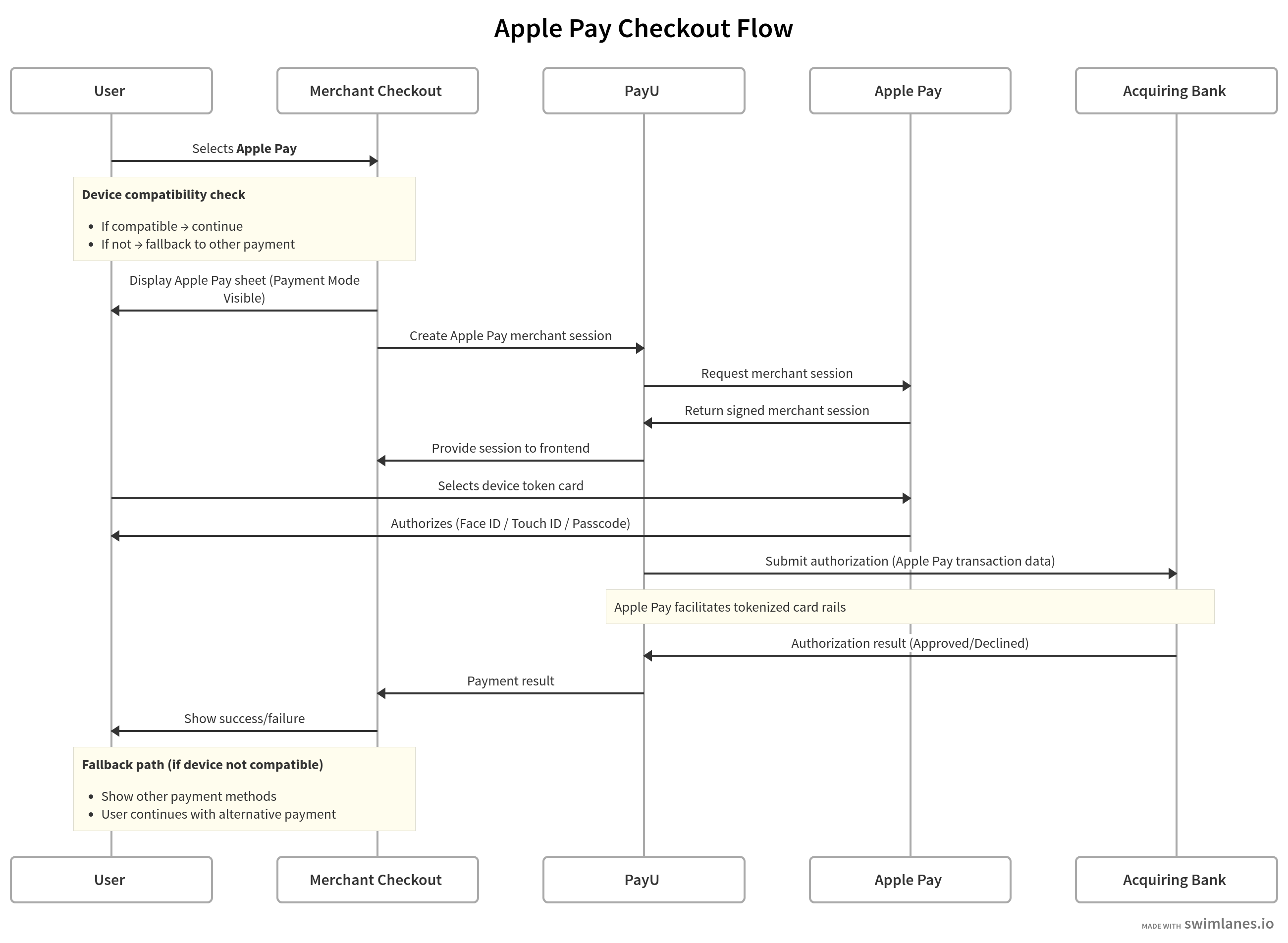
Technical summary
- User initiates payment by tapping the Apple Pay button. Apple Pay payment sheet appears with card and shipping info.
- User authenticates with Face ID, Touch ID, or passcode.
- Merchant server requests session validation from PayU.
- PayU sends validation request to Apple servers.
- Apple returns a valid merchant session object.
- PayU forwards session to merchant for completion.
- Apple generates encrypted payment token with card data.
- Merchant sends token to PayU for payment processing.
- PayU returns transaction status to merchant.
- Merchant shows success/failure to customer.
PayU Hosted Checkout flow
For merchants using PayU's hosted checkout:
- Customer selects Apple Pay on PayU checkout page
- PayU displays Apple Pay payment sheet
- Customer authenticates and authorizes payment
- PayU processes the payment and returns result
- Customer is redirected to merchant's success/failure URL
For step-by-step integration, refer to PayU Hosted Checkout Integration.
Seamless (direct API) flow
For merchants with direct API integration:
- Merchant displays Apple Pay button on their checkout page
- Customer taps Apple Pay button
- Merchant creates ApplePaySession and handles
onvalidatemerchantevent - Merchant server calls PayU API for merchant validation
- PayU validates with Apple and returns session
- Merchant completes merchant validation with session
- Customer authenticates payment
- Merchant receives payment token in
onpaymentauthorizedevent - Merchant sends token to PayU
_paymentAPI withpg=APPLEPAY - PayU processes payment and returns response
- Merchant completes payment and shows result
For step-by-step integration, refer to Merchant Hosted Checkout Integration, Merchant Hosted with Session Management Integration, or Apple Pay UI Seamless Integration.
APIs used in Apple Pay integration
| API | Purpose |
|---|---|
| Collect Payment API – Apple Pay (Merchant Hosted) | Process an Apple Pay payment token with pg=APPLEPAY and bankcode=APPLEPAY on merchant-hosted checkout. |
| Collect Payment API – PayU Hosted Checkout | Redirect customers to PayU Hosted Checkout with Apple Pay as the payment method. |
| Verify Payment API | Server-side reconciliation of transaction status after payment. |
Updated 3 months ago
