
Plans
Learn how to create, manage, activate, and update SI subscription plans using PayU Dashboard and APIs. Explore plan lifecycle, statuses, recurring billing flows, integration steps, request parameters, error handling, and best practices.
What is a Plan?
A plan defines the subscription terms that the customer accepts before a Standing Instruction (SI) mandate is registered. In API-based SI integrations, the plan is managed by your system and shared with PayU during the consent transaction through si_details.
A plan contains all subscription details except customer and payment method information. It defines:
- Billing amount (how much to charge)
- Billing type (recurring or one-time)
- Plan description and merchant reference
PayU does not require you to create a separate plan object before registering an SI mandate. Your frontend should maintain the plan configuration, show it to the customer, pass the approved values to PayU during consent, and use the returned mandate identifiers for future pre-debit notifications, recurring debits, and mandate management.
Handy Tips
- Creating a plan is optional - you can create a subscription without creating a plan
- You can create multiple subscriptions for a plan
How Plan Becomes a Subscription:
When you associate a plan with a customer and their payment method, it becomes a subscription. The merchant defines the subscription plan, and the customer subscribes to it by providing their payment details and consent.
For Example
- You create a Premium Monthly ₹499 plan (just a billing template)
- Customer A subscribes → Plan + Customer A's details + Payment Method = Subscription A
- Customer B subscribes → Same Plan + Customer B's details + Payment Method = Subscription B
Plan vs Subscription
| Aspect | Plan | Subscription |
|---|---|---|
| What is it? | Subscription template with billing details only | Plan + Customer details + Payment method |
| Who creates it? | Merchant (via Dashboard or API) | Customer (by subscribing to a plan with their payment details) |
| When is it created? | Before customer sees the offer | After customer provides payment details and consent |
| What does it contain? | Billing amount, billing type, plan description | Plan details + Customer information + Payment method + Mandate |
| Can it exist independently? | Yes, as a reusable template for multiple customers | No, must be linked to a specific customer and their payment method |
| Purpose | Define the billing terms that can be reused | Active billing arrangement for a specific customer |
| Example | "Premium Monthly ₹499" plan | Customer A subscribed to "Premium Monthly ₹499" using their card |
When Should You Create Plans?
You should create plans when you want to:
- Offer standardized subscription packages: Create reusable billing templates (e.g., "Basic ₹199/month", "Premium ₹499/month", "Enterprise ₹999/month") that multiple customers can subscribe to
- Enable self-service subscriptions: Allow customers to choose and subscribe to pre-defined plans without manual setup for each customer
- Simplify subscription management: Manage billing terms centrally - update a plan once, and it applies to all new subscriptions
- Generate payment links for subscriptions: Create shareable links where customers select a plan, provide their details, and complete payment to create their subscription
NotePlans are templates. You do not need plans if you are creating a unique, one-off billing arrangements for each customer via API.
Use Cases for Plan-based Subscriptions
Define tiered plans (Basic, Pro, Enterprise). Customers subscribe by selecting a plan and providing payment details.
Create content package plans. Each customer subscription links to the plan with their specific payment method.
Set up membership plans. Multiple customers subscribe to the same plan with their individual payment methods.
Define recurring payment plans for utilities or services. Each subscription created when customer provides payment details.
Prerequisites
Enable Subscriptions for your PayU merchant account. Contact your PayU Key Account Manager or onboarding team before integrating SI plans.
Benefits of Using Plans
Using plans provides merchants with a structured approach to managing subscription-based recurring payments.
Plan Benefits
- Reusable subscription templates: Create once, use for multiple customers with the same billing terms, reducing setup errors and saving time.
- Better dashboard controls: Manage all subscriptions from a centralized dashboard with clear visibility into plan status and associated subscriptions.
- Improved reconciliation: Plan ID or merchant reference, mandate ID, and transaction IDs can be mapped together for easier reporting and tracking.
- Safer modifications: Separate draft plan edits from active subscription changes, ensuring you don't accidentally modify live billing arrangements.
- Simplified subscription link generation: Quickly create payment links for customers to subscribe to predefined plans without recreating billing details each time.
Plan Lifecycle and Statuses
Plans in PayU can have the following statuses during their lifecycle:
Plans saved in the system but not yet activated. Draft plans cannot be used to create subscriptions. Use this status to prepare plans before making them available.
Plans that are activated and immediately available for creating subscription payment links. Active plans can have subscriptions associated with them.
Plans that have been deactivated. Archived plans cannot be used for new subscriptions but can be duplicated to create new plans with similar settings.
Access Plans
You can access Plans under Subscriptions from the left navigation as shown below.
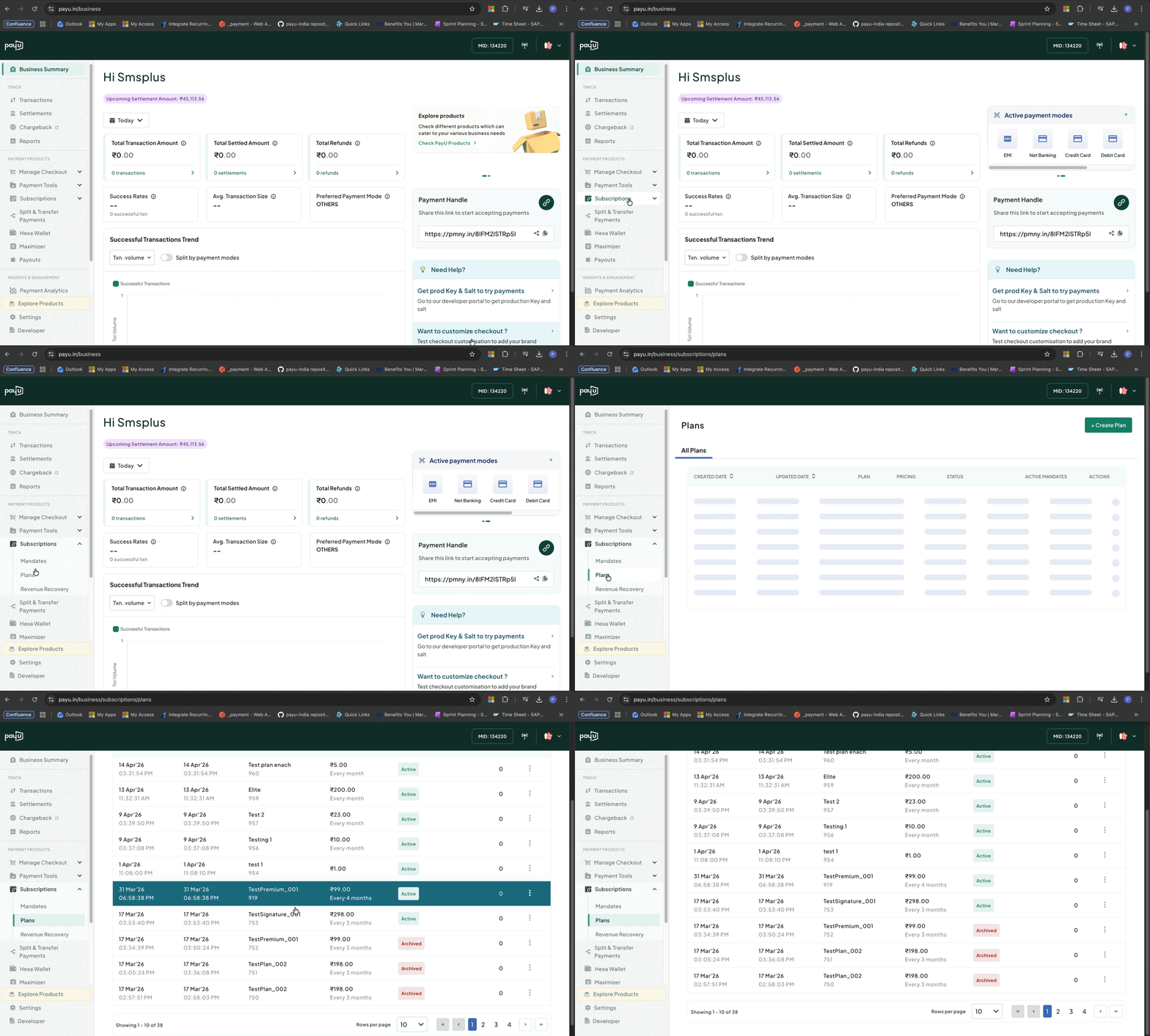
Access Plans
Plan Management Actions
From the PayU Dashboard, you can perform the following plan management actions:
For detailed step-by-step instructions, refer to Create and Manage Plans.
Frequently Asked Questions (FAQs)
Find answers to frequently asked questions about plans and subscription management.
Understanding Plans
-
What is a plan?
Answer
A plan is a subscription template that contains all subscription billing details except customer and payment method information. It includes billing amount, billing type (recurring or one-time), and plan description. When a plan is associated with a customer and their payment method, it becomes a subscription. Plans are created by merchants via the PayU Dashboard or APIs and can be reused for multiple customer subscriptions.
-
When should I create plans?
Answer
Create plans when you offer subscription-based services with recurring billing cycles. Plans are ideal for:
- SaaS platforms and digital services: Software subscriptions with monthly/annual billing
- OTT and streaming platforms: Content access with recurring charges
- Membership programs: Gym memberships, club subscriptions, loyalty programs
- Utility and service providers: Insurance premiums, utility bills, maintenance fees
Plans work best when you need reusable billing templates or want non-technical teams to manage subscriptions via the Dashboard.
-
What is the difference between a plan and a subscription?
Answer
Plan: A billing template containing subscription details minus customer and payment method information (created by merchant).
Subscription: Plan + Customer details + Payment method (created when customer subscribes).
Example: You create a "Premium Monthly ₹499" plan. When Customer A subscribes by providing their card details and consent, a subscription is created linking the plan to Customer A's card. The same plan can be used when Customer B subscribes with their own payment details, creating a separate subscription. -
Can a customer have multiple subscriptions?
Answer
Yes, a customer can subscribe to multiple plans. Each time they subscribe, a new subscription is created that links the plan to their payment method. For example, a customer might subscribe to both an "OTT Basic ₹199" plan and a "Cloud Storage ₹99" plan, creating two separate subscriptions with their own billing schedules.
-
Is plan status the same as subscription status?
Answer
No. Plan status is merchant-controlled (Draft, Active, Archived) and indicates whether the billing template is available for creating new subscriptions. Subscription status is customer-specific and indicates the state of an individual customer's subscription (Active, Paused, Cancelled, Expired).
-
How does billing cycle configuration work?
Answer
Billing cycle is configured using two parameters:
Billing Cycle: The unit of time (DAILY, WEEKLY, MONTHLY, YEARLY)
Billing Interval: How many units between charges
Examples:- Monthly subscription: billingCycle=MONTHLY, billingInterval=1
- Quarterly subscription: billingCycle=MONTHLY, billingInterval=3
- Every 3 days: billingCycle=DAILY, billingInterval=3
- Bi-weekly: billingCycle=WEEKLY, billingInterval=2
Managing Plans
-
What is the difference between Draft and Active plans?
Answer
Draft: Plans that are saved but not activated. Cannot be used to create subscriptions. Use this status to prepare plans before making them available.
Active: Plans that are activated and ready to use. Can be used to create subscription payment links immediately. -
Can I edit a plan?
Answer
Yes, you can edit plans through the PayU Dashboard. However, certain fields may have editing restrictions depending on whether the plan has active subscriptions.
-
Can I delete a plan?
Answer
No, you cannot permanently delete a plan. However, you can deactivate it, which moves the plan to Archived status. Archived plans cannot be used for new subscriptions but can be duplicated to create new plans with similar settings.
-
Can I duplicate a plan?
Answer
Yes, you can duplicate any plan (Draft, Active, or Archived) to create a new plan with the same configuration. When duplicating, you must provide a unique Plan ID for the new plan. This is useful for creating similar plans with minor variations.
-
Can I pause or resume a plan?
Answer
No, plans do not have pause/resume functionality. Plans can only be in Draft, Active, or Archived status. To temporarily stop using a plan, deactivate it (moves to Archived). To use it again, duplicate it to create a new active plan.
-
Can I edit a plan that has active subscriptions?
Answer
Yes, you can edit plans with active subscriptions, but changes to certain fields like billing amount or billing cycle may only apply to new subscriptions created after the edit. Existing active subscriptions typically continue with their original plan terms. For specific field-level edit restrictions, refer to the plan management documentation.
Updated 20 days ago
