
UPI CC & CL Integration with Convenience Fee
Unified Payments Interface (UPI) has evolved to allow customers to authorize payments using a variety of instruments — such as Credit Cards (UPI CC), Prepaid Instruments / wallets (UPI PPI), and Credit Lines (UPI CL) — directly through TPAP apps, while merchants continue to initiate these transactions as standard UPI requests with a fixed amount.
Until recently, this model did not support convenience fees for these credit-based instruments because the transaction amount could not be updated at the time of authorization.
NPCI has now introduced a solution that enables convenience-fee-enabled merchants to apply and collect convenience fees on eligible UPI instruments (UPI CC, UPI CL, and UPI PPI) by allowing the customer's payable amount to be updated during authorization. As a result, the merchant receives the transaction with the updated amount — ensuring correct fee recovery while maintaining a seamless UPI payment experience for customers.
This guide describes the flow, specifications, and merchant configurations required to support the convenience fee for UPI CC, UPI CL, and UPI PPI.
Regulatory Note: Convenience fee on UPI PPI (wallet) is not allowed as of today per the regulator. However, the technical provision is available and will be enabled as and when the commercials on UPI PPI are introduced.
Convenience Fee Configuration
PayU recommends you to follow these steps to configure convenience fee:
- Configure the convenience fee at PayU as either a percentage or a flat amount for each applicable instrument:
- UPI CC
- UPI CL
- UPI PPI
- Separate convenience fees can be configured for UPI CC and UPI CL. During the transaction, whichever value is greater is passed in the intent's
CCONFEEtag (NPCI does not currently allow distinct tags for CC and CL). - No additional handling is required from the merchant during the payment process. PayU automatically:
- Computes the convenience fee from your configuration.
- Appends the
splitparameter to the intent string. - Validates the authorized amount against the configured fee.
- Returns the final amount along with the convenience fee breakup in the response and webhook.
Setting up convenience fee: Contact your PayU Key Account Manager (KAM) or PayU Support to enable and configure UPI CC, UPI CL, and UPI PPI convenience fees on your merchant account.
Key Highlights
- Convenience fee is supported only via UPI Intent and Dynamic QR flows (it can only be embedded in an intent string).
- The fee is conveyed using the NPCI
splitparameter on the intent URI. - The convenience fee applies only when the customer pays using a credit-based instrument (UPI CC, UPI CL, or UPI PPI). When the customer chooses a Savings/Current bank account, no convenience fee is added to the transaction amount.
- The merchant initiates the transaction with the base amount only. PayU automatically appends the convenience fee in the intent string based on the merchant's configuration.
Supported Instruments
| Instrument | Description | Split Parameter Used |
|---|---|---|
| UPI CC | UPI Credit Card | CCONFEE |
| UPI CL | UPI Credit Line | CCONFEE |
| UPI PPI | UPI Prepaid Payment Instrument (wallet) | PCONFEE |
Note: NPCI does not currently support separate split tags for UPI CC and UPI CL — both share the
CCONFEEtag. If different fees are configured at PayU for UPI CC and UPI CL, the maximum of the two is passed in the intent string.
Transaction Flow
- The merchant initiates a UPI Intent or Dynamic QR transaction at PayU with a fixed (base) amount.
- PayU evaluates the merchant's convenience-fee configuration and appends the
splitparameter to the intent string with the applicable fee tags (CCONFEEand/orPCONFEE). - The customer scans the dynamic QR or selects the Payer PSP app for the intent flow.
- The Payer PSP app reads the
splitparameter from the QR / intent string. - When the customer selects:
- Credit Card / Credit Line / Wallet → the PSP app displays
base amount + applicable convenience feeand debits this total from the chosen instrument. - Savings / Current account → the PSP app displays only the
base amount; the convenience fee is not added.
- Credit Card / Credit Line / Wallet → the PSP app displays
- PayU receives the authorization with the updated amount, validates it against the configured fee, and forwards the result to the merchant via the standard payment response and webhook.
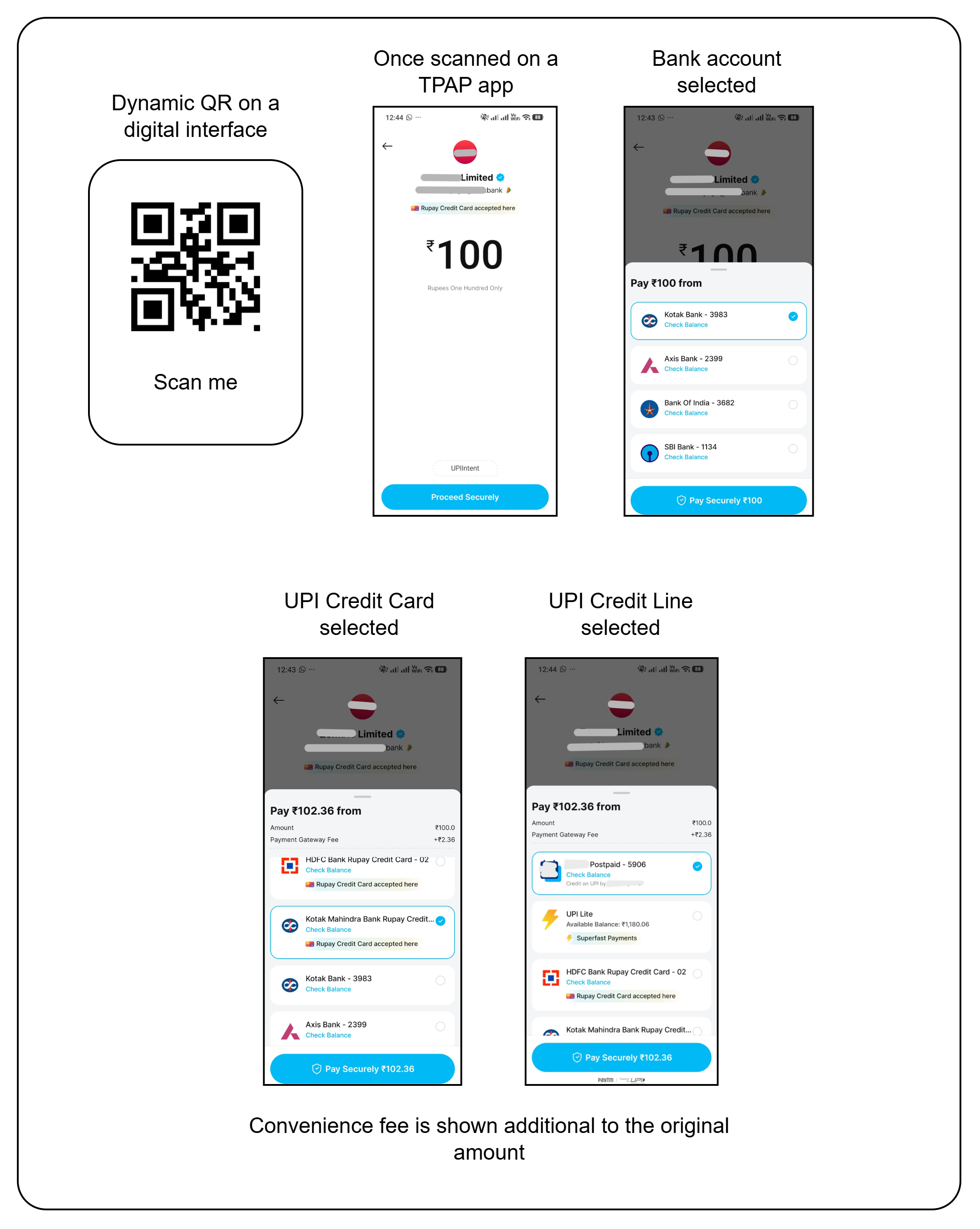
Technical Flow
sequenceDiagram
    participant Customer
    participant PSP as Payer PSP App
    participant Merchant
    participant PayU
    participant NPCI

    Merchant->>PayU: Initiate UPI Intent / Dynamic QR (base amount)
    PayU-->>Merchant: Intent string with split=CCONFEE:x|PCONFEE:y
    Merchant-->>Customer: Show QR / launch Intent
    Customer->>PSP: Scan QR / select PSP app
    PSP->>PSP: Parse split parameter
    Customer->>PSP: Select payment instrument
    alt Credit Card / Credit Line / Wallet
        PSP-->>Customer: Display (base + convenience fee)
        Customer->>PSP: Authorize
        PSP->>NPCI: Debit (base + convenience fee)
    else Savings / Current account
        PSP-->>Customer: Display base amount only
        Customer->>PSP: Authorize
        PSP->>NPCI: Debit base amount
    end
    NPCI->>PayU: Transaction status with updated amount
    PayU->>Merchant: Webhook / response with final amount
The split Parameter
The convenience fee is passed in the intent URI through the NPCI split parameter. The parameter has two sub-keys:
| Sub-key | Description | Applicable Instruments |
|---|---|---|
CCONFEE | Convenience fee for UPI CC and UPI CL. As NPCI does not yet support separate tags for CC and CL, the maximum of the two configured fees is passed. | UPI CC, UPI CL |
PCONFEE | Convenience fee for UPI PPI (wallet). | UPI PPI |
Sample Intent String
A sample UPI intent URI carrying both UPI CC/CL and UPI PPI convenience fees:
upi://pay?pa=testmerchant@acquiringbank&pn=merchant&tr=29999999999&tid=PPPXXXXXXXXX&am=100.00&cu=INR&tn=UPIIntent&split=CCONFEE:2.36|PCONFEE:1Breakdown of the relevant parameters:
| Parameter | Description |
|---|---|
pa | Payee VPA (acquiring merchant VPA) |
pn | Payee name |
tr | Transaction reference |
tid | Transaction ID |
am | Base transaction amount |
cu | Currency (INR) |
tn | Transaction note |
split | Convenience fee container — pipe (|) separated KEY:VALUE pairs (CCONFEE, PCONFEE) |
Behaviour by Selected Instrument
Assuming a base amount of ₹100, with CCONFEE = 2.36 and PCONFEE = 1.00:
| Customer Selects | Amount Displayed in PSP App | Amount Debited |
|---|---|---|
| UPI Credit Card | ₹102.36 | ₹102.36 |
| UPI Credit Line | ₹102.36 | ₹102.36 |
| UPI Wallet (PPI) | ₹101.00 (when commercials are enabled) | ₹101.00 |
| Savings / Current Account | ₹100.00 | ₹100.00 |
Important Considerations
- Convenience fee on credit-based UPI instruments works only with the Intent and Dynamic QR flows — it cannot be applied to Collect (VPA) flows.
- The fee is enforced at the PSP app level using the
splitparameter; merchants must not attempt to compute or add the fee to theam(amount) field directly. - Refund handling for the convenience fee may differ across PayU configurations. Confirm refund policy for convenience fee with your PayU KAM.
- Validation at PayU rejects authorizations where the received amount does not match
base amount + applicable convenience feefor the selected instrument category.
Related Documentation
Updated 5 months ago
