
Cards - Native OTP Flow
The steps involved in cards with Native OTP:
Customer Experience
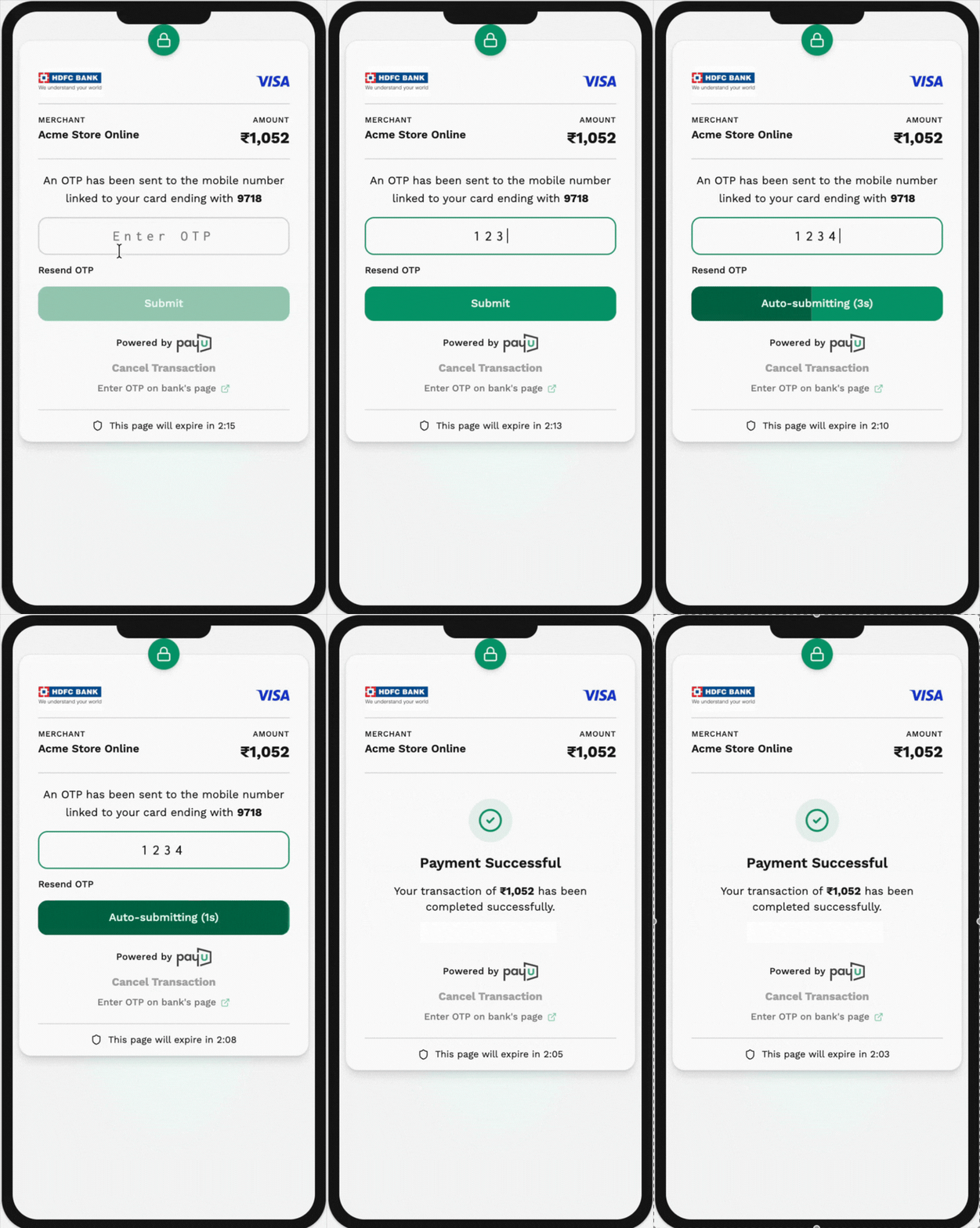
Step 1: Initiate the payment request
Request parameters
Send the following additional parameters to PayU through a server-to-server curl request to initiate the payment. As a result of this API call, the customer will receive the OTP. For sample request and response, refer to Collect Payment API - Server-to-Server.
| Parameter | Description | Example |
|---|---|---|
keymandatory | String The merchant key, a unique identifier provided by PayU during onboarding. | JP****g |
txnidmandatory | String The transaction ID, a unique reference generated by the merchant for a specific order to track and process the transaction. | ashdfu72634 |
amountmandatory | String The payment amount for the transaction in decimal format. | 10.00 |
productinfomandatory | String A brief description of the product or service related to the payment. | iPhone |
firstnamemandatory | String The first name of the customer initiating the transaction. | Ashish |
emailmandatory | String The email address of the customer. | [email protected] |
phonemandatory | String The phone number of the customer for transaction or support purposes. | 9988776655 |
pgmandatory | String The payment gateway type. For card payments, the value is always CC. | CC |
bankcodemandatory | String The bank code identifying the card type. In this regard, include "CC" only. | CC |
ccnummandatory | String The card number entered by the customer, which must be a 13-19 digit valid card number. | 5123456789012346 |
ccnamemandatory | String Name on the card as entered by the customer. | John Doe |
ccvvmandatory | String The CVV code for the card. Typically 3 digits for most cards, or 4 digits for AMEX cards. | 123 |
ccexpmonmandatory | String Expiry month of the card in MM format (e.g., '01' for January). | 01 |
ccexpyrmandatory | String Expiry year of the card in YYYY format, as entered by the customer. | 2024 |
surlmandatory | String The success URL, used to redirect the customer after a successful transaction. | https://yourdomain.com/success |
furlmandatory | String The failure URL, used to redirect the customer in case the transaction fails. | https://yourdomain.com/failure |
hashmandatory | String The computed hash ensuring security and verifying the transaction integrity. | eabec285da28fd0... |
s2s_device_infomandatory | String This parameter must have the customer agent's device. | Mozilla |
s2s_client_ipmandatory | String This parameter must have the source IP of the customer. | 10.11.101.11 |
txn_s2s_flowmandatory | String This parameter must be passed with the value as 4. | 4 |
address1optional | String The first line of the billing address for fraud detection and chargeback issues. | H.No-123, Street X |
address2optional | String The second line of the billing address, if available. | Apartment 456 |
cityoptional | String Billing address city of the customer. | Mumbai |
stateoptional | String Billing address state of the customer. | Maharashtra |
countryoptional | String Billing address country of the customer. | India |
zipcodeoptional | String Billing address zip code for the transaction. | 400004 |
udf1optional | String User-defined field allowing merchants to store transaction-related metadata. | Custom Data |
udf2optional | String User-defined field allowing merchants to store transaction-related metadata. | Custom Data |
udf3optional | String User-defined field allowing merchants to store transaction-related metadata. | Custom Data |
udf4optional | String User-defined field allowing merchants to store transaction-related metadata. | Custom Data |
udf5optional | String User-defined field allowing merchants to store transaction-related metadata. | Custom Data |
Sample request
curl -X POST "https://test.payu.in/_payment" \
-H "accept: application/json" \
-H "Content-Type: application/x-www-form-urlencoded" \
-d "key=JP***g" \
-d "txnid=EaE4ZO3vU4iPsp" \
-d "amount=10.00" \
-d "firstname=Ashish" \
-d "[email protected]" \
-d "phone=9876543210" \
-d "productinfo=iPhone" \
-d "pg=CC" \
-d "bankcode=CC" \
-d "surl=https://apiplayground-response.herokuapp.com/" \
-d "furl=https://apiplayground-response.herokuapp.com/" \
-d "ccnum=1234" \
-d "ccexpmon=05" \
-d "ccexpyr=2022" \
-d "ccvv=123" \
-d "ccname=undefined" \
-d "store_card_token=1234 4567 2456 3566" \
-d "storecard_token_type=1" \
-d 'additional_info={"last4Digits": "1234", "tavv": "ABCDEFGH","trid":"1234567890", "tokenRefNo":"abcde123456"}' \
-d "panNumber=ABCDE1234A" \
-d "s2s_device_info=Mozilla" \
-d "s2s_client_ip=10.11.101.11" \
-d "txn_s2s_flow=4" \
-d "hash=fc3206829a6b4f8e300aeefb8f91add568b83dc90d01383a8e16553cc9600a3aefd4be2e370d32f0315ef1b9f28740515a9556b55abfefa7b54b434f894c9304"
/**
 * PayU Cardless EMI Payment with Native OTP Flow Integration
 *
 * IMPORTANT: This should only be executed server-side (e.g., in Node.js), never in the browser,
 * as it contains sensitive payment and PAN information.
 */

// Additional info as a JSON object
const additionalInfo = {
  "last4Digits": "1234",
  "tavv": "ABCDEFGH",
  "trid": "1234567890",
  "tokenRefNo": "abcde123456"
};

// Form data parameters
const formData = new URLSearchParams();
formData.append('key', 'JP***g');                  // Your merchant key
formData.append('txnid', 'EaE4ZO3vU4iPsp');       // Unique transaction ID
formData.append('amount', '10.00');               // Payment amount
formData.append('firstname', 'Ashish');           // Customer's name
formData.append('email', '[email protected]');       // Customer's email
formData.append('phone', '9876543210');           // Customer's phone
formData.append('productinfo', 'iPhone');         // Product information
formData.append('pg', 'EMI');                     // Payment gateway (EMI)
formData.append('bankcode', 'EMI03');             // Bank code (Cardless EMI provider)
formData.append('surl', 'https://apiplayground-response.herokuapp.com/'); // Success URL
formData.append('furl', 'https://apiplayground-response.herokuapp.com/'); // Failure URL
// Card and token details
formData.append('ccnum', '1234');                 // Limited card details
formData.append('ccexpmon', '05');                // Expiry month
formData.append('ccexpyr', '2022');               // Expiry year
formData.append('ccvv', '123');                   // CVV
formData.append('ccname', 'undefined');           // Cardholder name
formData.append('store_card_token', '1234 4567 2456 3566'); // Tokenized card
formData.append('storecard_token_type', '1');     // Token type
formData.append('additional_info', JSON.stringify(additionalInfo)); // Tokenization details

// Native OTP flow parameters
formData.append('panNumber', 'ABCDE1234A');       // Customer PAN number
formData.append('s2s_device_info', 'Mozilla');    // Customer device info
formData.append('s2s_client_ip', '10.11.101.11'); // Customer IP address
formData.append('txn_s2s_flow', '4');             // Server-to-server flow (4 for Native OTP)

// Security hash
formData.append('hash', 'fc3206829a6b4f8e300aeefb8f91add568b83dc90d01383a8e16553cc9600a3aefd4be2e370d32f0315ef1b9f28740515a9556b55abfefa7b54b434f894c9304');

// Request options
const requestOptions = {
  method: 'POST',
  headers: {
    'accept': 'application/json',
    'Content-Type': 'application/x-www-form-urlencoded'
  },
  body: formData
};

// Execute the request
fetch('https://test.payu.in/_payment', requestOptions)
  .then(response => {
    console.log('Status Code:', response.status);
    return response.text(); // or response.json() if you're sure it returns JSON
  })
  .then(data => {
    console.log('Response:', data);
    // Process payment response here and handle OTP flow
  })
  .catch(error => {
    console.error('Error:', error);
  });
import urllib.request
import urllib.parse
import json
from typing import Dict, Any

def process_cardless_emi_with_native_otp() -> Dict[str, Any]:
    """
    Process cardless EMI payment with Native OTP flow using PayU's S2S integration

    IMPORTANT: This is a server-side function. Never expose payment details to client-side code.

    Returns:
        Dictionary with response from PayU API
    """
    # API endpoint
    url = "https://test.payu.in/_payment"

    # Additional info as a dictionary
    additional_info = {
        "last4Digits": "1234",
        "tavv": "ABCDEFGH",
        "trid": "1234567890",
        "tokenRefNo": "abcde123456"
    }

    # Prepare the form data
    payload = {
        "key": "JP***g",                     # Your merchant key
        "txnid": "EaE4ZO3vU4iPsp",           # Unique transaction ID
        "amount": "10.00",                   # Payment amount
        "firstname": "Ashish",               # Customer's name
        "email": "[email protected]",           # Customer's email
        "phone": "9876543210",               # Customer's phone
        "productinfo": "iPhone",             # Product information
        "pg": "EMI",                         # Payment gateway (EMI)
        "bankcode": "EMI03",                 # Bank code (Cardless EMI provider)
        "surl": "https://apiplayground-response.herokuapp.com/", # Success URL
        "furl": "https://apiplayground-response.herokuapp.com/", # Failure URL
        # Card and token details
        "ccnum": "1234",                     # Limited card details
        "ccexpmon": "05",                    # Expiry month
        "ccexpyr": "2022",                   # Expiry year
        "ccvv": "123",                       # CVV
        "ccname": "undefined",               # Cardholder name
        "store_card_token": "1234 4567 2456 3566", # Tokenized card
        "storecard_token_type": "1",         # Token type
        "additional_info": json.dumps(additional_info), # Tokenization details

        # Native OTP flow parameters
        "panNumber": "ABCDE1234A",           # Customer PAN number
        "s2s_device_info": "Mozilla",        # Customer device info
        "s2s_client_ip": "10.11.101.11",     # Customer IP address
        "txn_s2s_flow": "4",                 # Server-to-server flow (4 for Native OTP)

        # Security hash
        "hash": "fc3206829a6b4f8e300aeefb8f91add568b83dc90d01383a8e16553cc9600a3aefd4be2e370d32f0315ef1b9f28740515a9556b55abfefa7b54b434f894c9304"
    }

    # Convert dictionary to URL-encoded form data
    data = urllib.parse.urlencode(payload).encode('utf-8')

    # Set headers
    headers = {
        "accept": "application/json",
        "Content-Type": "application/x-www-form-urlencoded"
    }

    # Create a request object
    req = urllib.request.Request(url, data=data, headers=headers, method="POST")

    try:
        # Send the request and get the response
        with urllib.request.urlopen(req) as response:
            response_data = response.read().decode('utf-8')

            # Process and return response
            return {
                "status_code": response.getcode(),
                "response": response_data
            }

    except urllib.error.HTTPError as e:
        # Handle HTTP errors
        error_data = e.read().decode('utf-8')
        return {
            "status_code": e.code,
            "error": e.reason,
            "response": error_data
        }

    except Exception as e:
        # Handle other exceptions
        return {
            "status_code": 500,
            "error": str(e),
            "response": "An error occurred during payment processing"
        }

# Example usage
if __name__ == "__main__":
    result = process_cardless_emi_with_native_otp()
    print(f"Status Code: {result['status_code']}")
    if 'error' in result:
        print(f"Error: {result['error']}")
    print(f"Response: {result['response']}")

    # Handle OTP flow based on the response
    # In Native OTP flow, you'll need to handle OTP verification
<?php
/**
 * Process cardless EMI payment with Native OTP flow using PayU's S2S integration
 *
 * IMPORTANT: This is a server-side function. Never expose payment details to client-side code.
 *
 * @return array Response from PayU API
 */
function processCardlessEmiWithNativeOtp() {
    // API endpoint
    $url = "https://test.payu.in/_payment";

    // Additional info as an array
    $additionalInfo = [
        "last4Digits" => "1234",
        "tavv" => "ABCDEFGH",
        "trid" => "1234567890",
        "tokenRefNo" => "abcde123456"
    ];

    // Prepare the form data
    $payload = [
        "key" => "JP***g",                      // Your merchant key
        "txnid" => "EaE4ZO3vU4iPsp",            // Unique transaction ID
        "amount" => "10.00",                    // Payment amount
        "firstname" => "Ashish",                // Customer's name
        "email" => "[email protected]",            // Customer's email
        "phone" => "9876543210",                // Customer's phone
        "productinfo" => "iPhone",              // Product information
        "pg" => "EMI",                          // Payment gateway (EMI)
        "bankcode" => "EMI03",                  // Bank code (Cardless EMI provider)
        "surl" => "https://apiplayground-response.herokuapp.com/", // Success URL
        "furl" => "https://apiplayground-response.herokuapp.com/", // Failure URL
        // Card and token details
        "ccnum" => "1234",                      // Limited card details
        "ccexpmon" => "05",                     // Expiry month
        "ccexpyr" => "2022",                    // Expiry year
        "ccvv" => "123",                        // CVV
        "ccname" => "undefined",                // Cardholder name
        "store_card_token" => "1234 4567 2456 3566", // Tokenized card
        "storecard_token_type" => "1",          // Token type
        "additional_info" => json_encode($additionalInfo), // Tokenization details

        // Native OTP flow parameters
        "panNumber" => "ABCDE1234A",            // Customer PAN number
        "s2s_device_info" => "Mozilla",         // Customer device info
        "s2s_client_ip" => "10.11.101.11",      // Customer IP address
        "txn_s2s_flow" => "4",                  // Server-to-server flow (4 for Native OTP)

        // Security hash
        "hash" => "fc3206829a6b4f8e300aeefb8f91add568b83dc90d01383a8e16553cc9600a3aefd4be2e370d32f0315ef1b9f28740515a9556b55abfefa7b54b434f894c9304"
    ];

    // Initialize cURL session
    $ch = curl_init($url);

    // Set cURL options
    curl_setopt($ch, CURLOPT_POST, true);
    curl_setopt($ch, CURLOPT_POSTFIELDS, http_build_query($payload));
    curl_setopt($ch, CURLOPT_RETURNTRANSFER, true);
    curl_setopt($ch, CURLOPT_HTTPHEADER, [
        "accept: application/json",
        "Content-Type: application/x-www-form-urlencoded"
    ]);

    // For additional security in production
    curl_setopt($ch, CURLOPT_SSL_VERIFYPEER, true);
    curl_setopt($ch, CURLOPT_SSL_VERIFYHOST, 2);

    // Execute the request
    $response = curl_exec($ch);
    $statusCode = curl_getinfo($ch, CURLINFO_HTTP_CODE);
    $error = curl_error($ch);
    $errno = curl_errno($ch);

    // Close cURL session
    curl_close($ch);

    // Handle response
    if ($errno) {
        return [
            "status_code" => 500,
            "error" => $error,
            "response" => "cURL Error: " . $error
        ];
    }

    // Process the response
    // In Native OTP flow, you'll need to handle OTP verification
    return [
        "status_code" => $statusCode,
        "response" => $response
    ];
}

// Example usage
$result = processCardlessEmiWithNativeOtp();
echo "Status Code: " . $result["status_code"] . "\n";
if (isset($result["error"])) {
    echo "Error: " . $result["error"] . "\n";
}
echo "Response: " . $result["response"] . "\n";
?>
import java.io.BufferedReader;
import java.io.DataOutputStream;
import java.io.IOException;
import java.io.InputStreamReader;
import java.net.HttpURLConnection;
import java.net.URL;
import java.net.URLEncoder;
import java.nio.charset.StandardCharsets;
import java.util.HashMap;
import java.util.Map;
import java.util.StringJoiner;

/**
 * PayU Cardless EMI Payment with Native OTP Flow Integration
 *
 * IMPORTANT: This is a server-side implementation. Never expose payment details to client-side code.
 */
public class PayUCardlessEmiWithNativeOtpProcessor {

    // API endpoint
    private static final String PAYU_TEST_URL = "https://test.payu.in/_payment";

    /**
     * Process cardless EMI payment with Native OTP flow through PayU
     * @return PaymentResponse containing status and response data
     */
    public PaymentResponse processCardlessEmiWithNativeOtp() {
        try {
            // Initialize URL
            URL url = new URL(PAYU_TEST_URL);

            // Additional info JSON
            String additionalInfo = "{"
                + "\"last4Digits\": \"1234\","
                + "\"tavv\": \"ABCDEFGH\","
                + "\"trid\": \"1234567890\","
                + "\"tokenRefNo\": \"abcde123456\""
                + "}";

            // Prepare form parameters
            Map<String, String> params = new HashMap<>();
            params.put("key", "JP***g");                      // Your merchant key
            params.put("txnid", "EaE4ZO3vU4iPsp");            // Unique transaction ID
            params.put("amount", "10.00");                    // Payment amount
            params.put("firstname", "Ashish");                // Customer's name
            params.put("email", "[email protected]");            // Customer's email
            params.put("phone", "9876543210");                // Customer's phone
            params.put("productinfo", "iPhone");              // Product information
            params.put("pg", "EMI");                          // Payment gateway (EMI)
            params.put("bankcode", "EMI03");                  // Bank code (Cardless EMI provider)
            params.put("surl", "https://apiplayground-response.herokuapp.com/"); // Success URL
            params.put("furl", "https://apiplayground-response.herokuapp.com/"); // Failure URL
            // Card and token details
            params.put("ccnum", "1234");                      // Limited card details
            params.put("ccexpmon", "05");                     // Expiry month
            params.put("ccexpyr", "2022");                    // Expiry year
            params.put("ccvv", "123");                        // CVV
            params.put("ccname", "undefined");                // Cardholder name
            params.put("store_card_token", "1234 4567 2456 3566"); // Tokenized card
            params.put("storecard_token_type", "1");          // Token type
            params.put("additional_info", additionalInfo);    // Tokenization details

            // Native OTP flow parameters
            params.put("panNumber", "ABCDE1234A");            // Customer PAN number
            params.put("s2s_device_info", "Mozilla");         // Customer device info
            params.put("s2s_client_ip", "10.11.101.11");      // Customer IP address
            params.put("txn_s2s_flow", "4");                  // Server-to-server flow (4 for Native OTP)

            // Security hash
            params.put("hash", "fc3206829a6b4f8e300aeefb8f91add568b83dc90d01383a8e16553cc9600a3aefd4be2e370d32f0315ef1b9f28740515a9556b55abfefa7b54b434f894c9304");

            // Convert parameters to URL-encoded form data
            StringJoiner formData = new StringJoiner("&");
            for (Map.Entry<String, String> entry : params.entrySet()) {
                formData.add(URLEncoder.encode(entry.getKey(), "UTF-8") + "=" +
                             URLEncoder.encode(entry.getValue(), "UTF-8"));
            }
            byte[] postData = formData.toString().getBytes(StandardCharsets.UTF_8);

            // Configure connection
            HttpURLConnection conn = (HttpURLConnection) url.openConnection();
            conn.setRequestMethod("POST");
            conn.setRequestProperty("accept", "application/json");
            conn.setRequestProperty("Content-Type", "application/x-www-form-urlencoded");
            conn.setRequestProperty("Content-Length", String.valueOf(postData.length));
            conn.setDoOutput(true);
            conn.setConnectTimeout(5000);
            conn.setReadTimeout(15000);

            // Send request
            try (DataOutputStream dos = new DataOutputStream(conn.getOutputStream())) {
                dos.write(postData);
                dos.flush();
            }

            // Get response
            int responseCode = conn.getResponseCode();

            // Read response data
            StringBuilder response = new StringBuilder();
            try (BufferedReader reader = new BufferedReader(
                    new InputStreamReader(
                        responseCode >= 400 ? conn.getErrorStream() : conn.getInputStream(),
                        StandardCharsets.UTF_8))) {

                String line;
                while ((line = reader.readLine()) != null) {
                    response.append(line);
                }
            }

            // Process the response
            // In Native OTP flow, you'll need to handle OTP verification
            return new PaymentResponse(responseCode, response.toString(), null);

        } catch (IOException e) {
            // Handle exception
            return new PaymentResponse(500, null, "Error: " + e.getMessage());
        }
    }

    /**
     * Payment response wrapper class
     */
    public static class PaymentResponse {
        private final int statusCode;
        private final String response;
        private final String error;

        public PaymentResponse(int statusCode, String response, String error) {
            this.statusCode = statusCode;
            this.response = response;
            this.error = error;
        }

        public int getStatusCode() {
            return statusCode;
        }

        public String getResponse() {
            return response;
        }

        public String getError() {
            return error;
        }

        public boolean isSuccess() {
            return statusCode >= 200 && statusCode < 300;
        }
    }

    // Example usage
    public static void main(String[] args) {
        PayUCardlessEmiWithNativeOtpProcessor processor = new PayUCardlessEmiWithNativeOtpProcessor();
        PaymentResponse result = processor.processCardlessEmiWithNativeOtp();

        System.out.println("Status Code: " + result.getStatusCode());
        if (result.isSuccess()) {
            System.out.println("Response: " + result.getResponse());
        } else {
            System.out.println("Error: " + result.getError());
        }
    }
}
using System;
using System.Collections.Generic;
using System.Net.Http;
using System.Threading.Tasks;
using System.Text;
using System.Text.Json;

namespace PayUCardlessEmiNativeOtpIntegration
{
    /// <summary>
    /// PayU Cardless EMI Payment with Native OTP Flow Processor
    ///
    /// IMPORTANT: This is a server-side implementation. Never expose payment details to client-side code.
    /// </summary>
    public class PayUCardlessEmiWithNativeOtpProcessor
    {
        // API endpoint
        private const string PayuTestUrl = "https://test.payu.in/_payment";

        /// <summary>
        /// Process cardless EMI payment with Native OTP flow through PayU
        /// </summary>
        /// <returns>PaymentResponse containing status and response data</returns>
        public async Task<PaymentResponse> ProcessCardlessEmiWithNativeOtpAsync()
        {
            try
            {
                // Create additional info object
                var additionalInfo = new
                {
                    last4Digits = "1234",
                    tavv = "ABCDEFGH",
                    trid = "1234567890",
                    tokenRefNo = "abcde123456"
                };

                // Serialize additional info to JSON
                string additionalInfoJson = JsonSerializer.Serialize(additionalInfo);

                // Prepare form parameters
                var formData = new Dictionary<string, string>
                {
                    { "key", "JP***g" },                       // Your merchant key
                    { "txnid", "EaE4ZO3vU4iPsp" },             // Unique transaction ID
                    { "amount", "10.00" },                     // Payment amount
                    { "firstname", "Ashish" },                 // Customer's name
                    { "email", "[email protected]" },             // Customer's email
                    { "phone", "9876543210" },                 // Customer's phone
                    { "productinfo", "iPhone" },               // Product information
                    { "pg", "EMI" },                           // Payment gateway (EMI)
                    { "bankcode", "EMI03" },                   // Bank code (Cardless EMI provider)
                    { "surl", "https://apiplayground-response.herokuapp.com/" }, // Success URL
                    { "furl", "https://apiplayground-response.herokuapp.com/" }, // Failure URL
                    // Card and token details
                    { "ccnum", "1234" },                       // Limited card details
                    { "ccexpmon", "05" },                      // Expiry month
                    { "ccexpyr", "2022" },                     // Expiry year
                    { "ccvv", "123" },                         // CVV
                    { "ccname", "undefined" },                 // Cardholder name
                    { "store_card_token", "1234 4567 2456 3566" }, // Tokenized card
                    { "storecard_token_type", "1" },           // Token type
                    { "additional_info", additionalInfoJson }, // Tokenization details

                    // Native OTP flow parameters
                    { "panNumber", "ABCDE1234A" },             // Customer PAN number
                    { "s2s_device_info", "Mozilla" },          // Customer device info
                    { "s2s_client_ip", "10.11.101.11" },       // Customer IP address
                    { "txn_s2s_flow", "4" },                   // Server-to-server flow (4 for Native OTP)

                    // Security hash
                    { "hash", "fc3206829a6b4f8e300aeefb8f91add568b83dc90d01383a8e16553cc9600a3aefd4be2e370d32f0315ef1b9f28740515a9556b55abfefa7b54b434f894c9304" }
                };

                // Create HttpClient with timeout
                using (var httpClient = new HttpClient())
                {
                    httpClient.Timeout = TimeSpan.FromSeconds(30);

                    // Convert form data to content
                    var content = new FormUrlEncodedContent(formData);

                    // Add headers
                    content.Headers.ContentType = new System.Net.Http.Headers.MediaTypeHeaderValue("application/x-www-form-urlencoded");
                    httpClient.DefaultRequestHeaders.Add("accept", "application/json");

                    // Send POST request
                    var response = await httpClient.PostAsync(PayuTestUrl, content);

                    // Get response content
                    var responseContent = await response.Content.ReadAsStringAsync();

                    // Process the response
                    // In Native OTP flow, you'll need to handle OTP verification
                    return new PaymentResponse(
                        (int)response.StatusCode,
                        responseContent,
                        null
                    );
                }
            }
            catch (Exception ex)
            {
                // Handle exception
                return new PaymentResponse(
                    500,
                    null,
                    $"Error: {ex.Message}"
                );
            }
        }

        /// <summary>
        /// Payment response wrapper class
        /// </summary>
        public class PaymentResponse
        {
            public int StatusCode { get; }
            public string Response { get; }
            public string Error { get; }

            public PaymentResponse(int statusCode, string response, string error)
            {
                StatusCode = statusCode;
                Response = response;
                Error = error;
            }

            public bool IsSuccess => StatusCode >= 200 && StatusCode < 300;
        }
    }

    // Example usage
    class Program
    {
        static async Task Main(string[] args)
        {
            var processor = new PayUCardlessEmiWithNativeOtpProcessor();
            var result = await processor.ProcessCardlessEmiWithNativeOtpAsync();

            Console.WriteLine($"Status Code: {result.StatusCode}");
            if (result.IsSuccess)
            {
                Console.WriteLine($"Response: {result.Response}");
                // Handle OTP verification here
            }
            else
            {
                Console.WriteLine($"Error: {result.Error}");
            }
        }
    }
}
Step 2: Submit the OTP
Once your customer enters the OTP on the payment page (postUrl/acsTemplate), pass the OTP using the Submit OTP API. For more information, refer to Submit OTP API.
Sample response
- Success scenario
{
  "metaData": {
    "txnId": "43242dfsdf",
    "referenceId": "348adsdas7d9ad798as7d87dsad87a9s",
    "txnStatus": "Enrolled",
    "unmappedStatus": "pending",
    "statusCode": "",
    "message": "",
    "submitOtp": {
      "status": "success"
    }
  },
  "result": {
    "mihpayid": "412345678912343542",
    "mode": "CC",
    "status": "success",
    "key": "hUmBue",
    "txnid": "0b33346c72c1d18e878b",
    "amount": "10.00",
    "addedon": "2019-12-09 11:42:41",
    "productinfo": "ProductInfo",
    "firstname": "Payu-Admin",
    "lastname": "",
    "address1": "",
    "address2": "",
    "city": "",
    "state": "",
    "country": "",
    "zipcode": "",
    "email": "[email protected]",
    "phone": "1234567890",
    "unmappedstatus": "captured",
    "hash": "04792dd6264c1dad0d4621..."
  }
}- Failure scenario
{
  "metaData": {
    "txnId": "43242dfsdf",
    "referenceId": "348adsdas7d9ad798as7d87dsad87a9s",
    "txnStatus": "Enrolled",
    "unmappedStatus": "pending",
    "statusCode": null,
    "message": null,
    "submitOtp": {
      "status": "failed",
      "attemptsLeft": 2
    }
  },
  "result": {}
}
Resend OTP
If the customer enters the incorrect OTP or an expired OTP, use Resend OTP API to handle the Resend OTP request made by a customer.
Step 3. Verify the Payment
Upon receiving the response, PayU recommends you performing a reconciliation step to validate all transaction details.
You can verify your payments using either of the following methods:
Configure the webhooks to monitor the status of payments.
Webhooks enable a server to communicate with another server by sending an HTTP callback or message.
These callbacks are triggered by specific events or instances and operate at the server-to-server (S2S) level.
Know how to manage Webhooks for Payments.
Environment
| Test Environment | https://test.payu.in/merchant/postservice.php?form=2 |
| Production Environment | https://info.payu.in/merchant/postservice.php?form=2 |
Note: The hash logic for Verify Payment API is:
sha512(key|command|var1|salt) sha512
Sample request
curl --request POST
--url 'https://test.payu.in/merchant/postservice?form=2'
--header 'Content-Type: application/x-www-form-urlencoded'
--data key=JPM7Fg
--data command=verify_payment
--data var1=IhfgcZnXR4o4nB
--data hash=a0ae79fdd66c875af6e9b21c4a67f1822deb00f2df5e9f0b1948f3222f536a9bf741b24efbb1874ca0f84f76b036e6c0d641581d0100f7abe4aeed2f3264f5c9
Sample response
If credit card payment is made, the response is similar to the following:
{
  "status":0,
  "msg":"0 out of 1 Transactions Fetched Successfully",
  "transaction_details":
{
"IhfgcZnXR4o4nB":
{
"mihpayid":"Not Found",
"status":"Not Found"
}
}
}
If txnID is not found, the response is similar to the following:
{
    "status":0,
    "msg":"0 out of 1 Transactions Fetched Successfully",
      "transaction_details":
      {
                      "IhfgcZnXR4o4nB":
        {
                              "mihpayid":"Not Found",
            "status":"Not Found"
          }
                      }
}
Response parameters
| Parameter | Description | Example |
|---|---|---|
| status | This parameter returns the status of web service call. The status can be any of the following:
| 0 |
| msg | This parameter returns the reason string. | For example, any of the following messages are displayed:
|
| transaction_details | This parameter contains the response in a JSON format. For more information refer to JSON fields description for transaction_details parameter . | |
| request_id | PayU Request ID for a request in a Transaction. For example, a transaction can have a refund request. | 7800456 |
| bank_ref_num | This parameter returns the bank reference number. If the bank provides after a successful action. | 204519474956 |
To learn more about the possible error codes and their description, refer to Error Codes.
Best Practices
The following best practices will help you improve the success rate when designing the Native OTP experience (card entry, OTP screen, and transitions).
Control
- Clearly communicate that the OTP request is initiated by the issuer or bank for security validation (not by the merchant alone).
- Ensure crucial details are always visible, for example:
- Transaction amount
- Customer’s bank name
- Partially masked card number
- Provide fallback options (e.g., resend OTP, manual overrides) so users retain autonomy and can recover from failures.
Familiarity
- Use familiar design patterns and terminology from your merchant screens on the Native OTP page. Consistency reassures users.
- Keep layout, zone ordering, and menu placements consistent across steps to reduce cognitive load.
- Make transitions between stages smooth and intuitive (e.g., card input → OTP input) to reinforce user confidence.
- Include trust indicators such as bank and network logos to convey visual reassurance.
Design Quality
- Ensure the core design adheres to professional standards while allowing merchant customization for branding. Balance consistency with your brand identity.
Efficiency
- Introduce friction only where it reinforces security (e.g., a visible timer on the “Resend OTP” button). Too little friction can introduce uncertainty; too much can cause frustration.
Implementation Guidelines
Before Payment (Card Entry)
- Clearly indicate that the payment is secure and that an OTP will be sent to the customer by the bank.
- Ask for card details (number, name, expiry, CVV) in a clear, accessible form with sensible validation (e.g., card number length, expiry in future, CVV length).
- If you collect billing address, ask only for what you will send in optional parameters; keep the form short to reduce drop-off.
OTP Step
- After initiating the payment, show a single, clear OTP input and a “Resend OTP” option where supported (with a visible timer per the Efficiency principle).
- Tell the user where the OTP will arrive (SMS, bank app, etc.) and that it may take a few seconds.
- Use a short timeout for OTP entry (e.g., 2–5 minutes) and show a clear message if the OTP expires or fails; offer “Try again” or “Use another card” where applicable.
- Do not ask for OTP on the same screen as card number/CVV; use a dedicated step or screen with smooth transition (Familiarity).
After Payment
- On success: Redirect to
surland show a clear success message; avoid showing sensitive data in the URL. Prefer showing order reference and next steps (e.g., email confirmation). - On failure: Redirect to
furland show a user-friendly error. Where possible, differentiate between “invalid OTP”, “card declined”, “network error” and suggest retry or another payment method. - Always confirm final status via PayU verification APIs before fulfilling the order; do not rely only on redirect or client-side logic.
Accessibility and Compliance
- Ensure labels, focus order, and error messages work with screen readers.
- Follow local regulations (e.g., RBI, PCI) and PayU’s acceptable use policy for card and OTP flows.
Updated 4 months ago
