
Cordova-Ionic PayU UPI Bolt UI SDK
Merchants who want to integrate only PayU UPI Bolt with their app. They can manage the checkout options on their checkout screen. Although they can use PayU UPI Bolt UI SDK for customer registration, payment, and profile management.
Steps to Integrate PayU Bolt SDK
Prerequisites
Supported iOS deployment target - iOS 17 and above.
To include the PayU UPI Bolt UI SDK in your project, add the following dependency to your package.json file:
UAT:
cordova plugin add [email protected]PRODUCTION:
cordova plugin add [email protected]Ensure that the application's minimum development target is set to version 13 or higher.
iOS Integration
To include the PayU UPI Bolt UI SDK in your project, add the following code snippet to your podfile.
Supported iOS deployment target - iOS 17 and above.
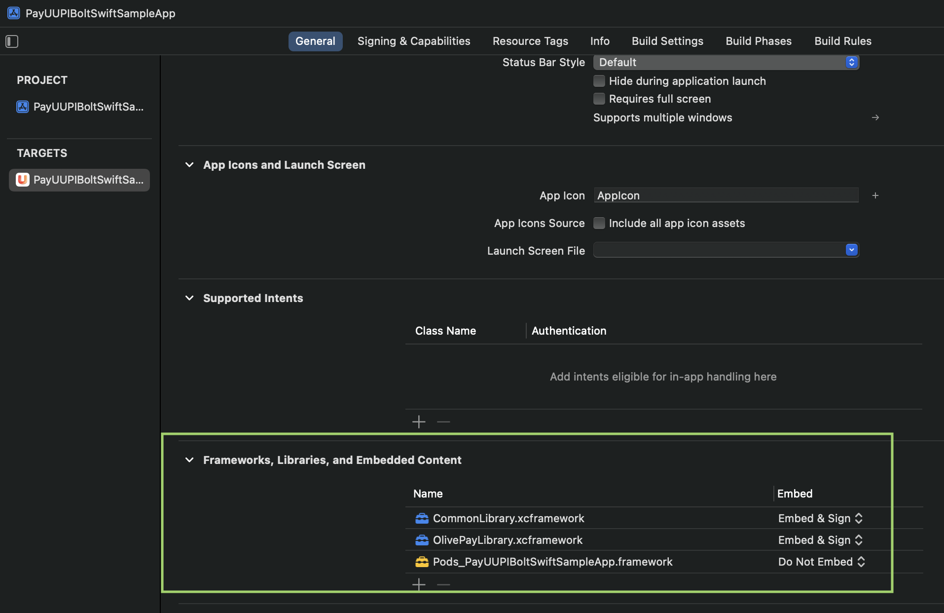
The following xcframework files will be provided by PayU during onboarding:
- NPCI - CommonLibrary.xcframework
- AXIS - OlivePayLibrary.xcframework
Add these framework in your project. The added framework is similar to the following screeshot:
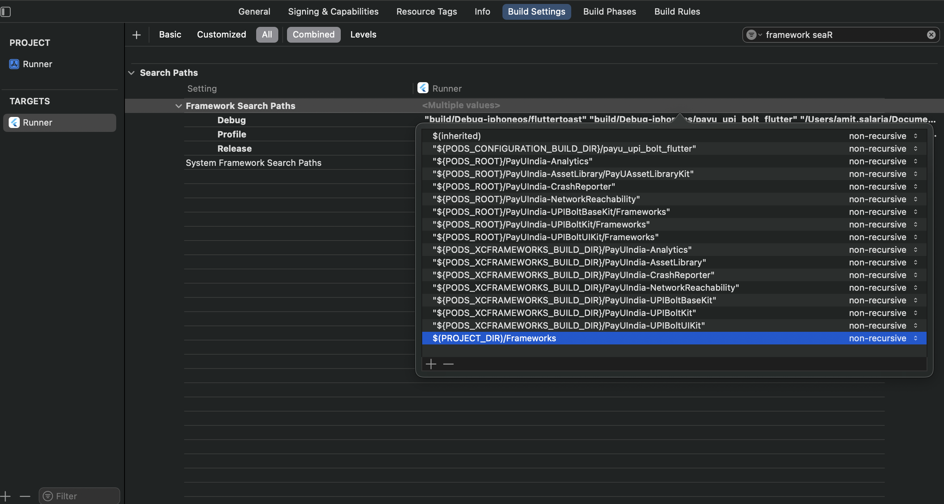
In Build Settings > Framework Search Path, add $(PROJECT_DIR)/Frameworks if it is not added automatically by Xcode.
Also, add the following dependency to the podfile of your Xcode app if not exists.
UAT:
pod 'PayUIndia-UPIBoltCoreKit', '3.0.0-alpha.1'PRODUCTION:
pod 'PayUIndia-UPIBoltCoreKit', '1.1.0'Android Integration
Add the following permissions in your AndroidManifest file.
<uses-permission android:name="android.permission.SEND_SMS"/>
<uses-permission android:name="android.permission.ACCESS_NETWORK_STATE" />
<uses-permission android:name="android.permission.INTERNET" />
<uses-permission android:name="android.permission.READ_PHONE_STATE" />
<uses-permission android:name="android.permission.READ_PHONE_NUMBERS" />
<uses-permission android:name="android.permission.ACCESS_COARSE_LOCATION" />
<uses-permission android:name="android.permission.ACCESS_FINE_LOCATION" />
UAT:
implementation 'in.payu:payu-upi-bolt-core-sdk:0.0.6-SNAPSHOT'Project-level build.gradle :
allprojects {
 repositories {
        maven {url "https://central.sonatype.com/repository/maven-snapshots/"}
   }
}
PRODUCTION:
implementation 'in.payu:payu-upi-bolt-core-sdk:0.0.5’Add the following dependency in the build.gradle file of your android app module:
implementation(files('libs/SecureComponent-release-prod_05062024_9d3904ab.aar'))Add the given aar file in the libs folder of your android app module:
<your_project>/android/app/libs/SecureComponent-release-prod_05062024_9d3904ab.aarStep 1: Initialization
It is used to initialize the SDK. This method returns an object that will be used to access other methods available in PayUUPIBoltUI.
Initialize the SDK with configuration:
const config = {
            merchantName: "<merchantName>", // String
            merchantKey: "<merchantKey>" // String,
            phone: "<phone>", // String
            email: "<email>", // String
            refId: "<refId>", // String
            pluginTypes: ["<pluginType>"], // Array<String>
            clientId: [<clientId>], // String
            issuingBanks: ["<issuingBanks>"], // Array<String>
            excludedBanksIINs: ["<excludedBanksIIN>"], // Array<String>
            isProduction: <isProduction> // Bool
           };

// To initialize the SDK
PayUUpiBoltUiCordova.initSDK(this.responseCallBack, config);

// To clear the SDK Instance
PayUUpiBoltUiCordova.reset(this.responseCallBack);
The following fields are needed as a request for this API:
| Parameter | Description | Example |
|---|---|---|
config |
|
{...} |
merchantName |
|
"MyStore Inc" |
merchantKey |
|
"gtKFFx" |
phone |
|
"+919876543210" |
email |
|
|
pluginTypes |
|
["AXIS", "HDFC", "BHIM"] |
isProduction |
|
true |
excludedBanksIINs |
|
["123456", "789012"] |
clientId |
|
"CLIENT_001" |
refId |
|
"REF_12345678" |
issuingBanks |
|
["AXIS", "HDFC"] |
Clear SDK Cache of PayUBolt SDK
The clearCache method is used to clear the cache corresponding to the passed PG value.
PayUUpiBoltUiCordova.clearCache(this.responseCallBack, pg);The following fields are needed as a request for this API:
| Field | Definition |
|---|---|
pg |
|
Response: Refer to SDK Response JSON Format
Check Plugin Registration Status of PayUBolt SDK
The isRegistered method is used to check pg registration status.
PayUUpiBoltUiCordova.isRegistered(this.responseCallBack, pg);| Field | Definition |
|---|---|
pg |
|
Response: Refer to SDK Response JSON Format
Callback: The callback will have the below response format.
Step 2. Check if UPI Bolt is Enabled
This method is used to check whether the upi bolt is enabled for the merchant or not.
PayUUpiBoltUiCordova.isUPIBoltEnabled(this.responseCallBack);Response: Refer to SDK Response JSON Format
| Field | Definition |
|---|---|
code |
|
message |
|
Step 3. Register and Pay
This API allows you to initialize registration and payment flow. It will internally authenticate and register the customer. After successful authentication and registration, the user will follow the payment journey. Once payment is completed, based on the payment status the merchant will get a callback through the listener.
Payment Parameters
| Parameter | Description |
|---|---|
amount |
|
productInfo |
|
firstName |
|
surl |
|
furl |
|
ios_surl |
|
ios_furl |
|
initiationMode |
|
purpose |
|
txnId |
|
udf1 - udf6 |
|
isCCTxnEnabled |
|
Sample Code
const currentTimeMillis = new Date().getTime();

const paymentParams = {
amount: "<amount>", // String
productInfo: "<productInfo>", // String
firstName: "<firstName>", // String
surl: "<successUrl>", // String (Android success URL)
furl: "<failureUrl>", // String (Android failure URL)
ios_surl: "<iosSuccessUrl>", // String (iOS success URL)
ios_furl: "<iosFailureUrl>", // String (iOS failure URL)
initiationMode: "<initiationMode>", // String (e.g., "10")
purpose: "<purpose>", // String (e.g., "00")
udf1: "<udf1>", // String (Optional)
udf2: "<udf2>", // String (Optional)
udf3: "<udf3>", // String (Optional)
udf4: "<udf4>", // String (Optional)
udf5: "<udf5>", // String (Optional)
txnId: "<txnId>", // String (Unique transaction ID)
isCCTxnEnabled: <trueOrFalse>, // Boolean (Enable card fallback if supported),
beneficiaryDetails: [ // (Optional) For TPV txn only
  {
    accountNumber: <account_number>, // String
    ifscCode: <ifsc_code> // String
  },
  // Add more beneficiaries as needed
]
};

PayUUpiBoltUiCordova.registerAndPay(this.responseCallBack, paymentParams);
Response: Map Refer to SDK Response JSON Format.
| Field | Definition |
|---|---|
result |
Payment Response |
Step 4. Open UPI Management
This API allows you to manage UPI accounts and transaction history.
// Screen Types
const screenType = <screenType> // String

PayUUpiBoltUiCordova.openUPIManagement(this.responseCallBack, screenType);
Request Parameters
| Parameter | Description |
|---|---|
screenType |
• ALL • TRANSACTIONHISTORY • MANAGEUPIACCOUNTS • DISPUTE • DEREGISTERUPI |
Response: Map Refer to SDK Response JSON Format
Step 5. Listener/Callback logic
The listener/callback contains following methods where the merchant app will get the API response and hash-related callbacks.
responseCallBack = (response: any) => {
console.log('responseCallBack : ', JSON.stringify(response));

// 1. onPayUSuccess(Map response): It will contain success response.
if ('onPayUSuccess' in response) {
  this.showAlert(JSON.stringify(response));
  return;
}

// 2. onPayUFailure(Map response): It will contain failure response.
if ('onPayUFailure' in response) {
  this.showAlert(JSON.stringify(response));
  return;
}

// 3. onPayUCancel(Map response): It will tell if payment was cancelled.
if ('onPayUCancel' in response) {
  this.showAlert(JSON.stringify(response));
  return;
}

// 4. onError(Map response): It will tell if any error occurred.
if ('onError' in response) {
  this.showAlert(JSON.stringify(response));
  return;
}

// 5. isUPIBoltEnabled(Map response): It will tell if UPI Bolt SDK is enabled.
if ('isUPIBoltEnabled' in response) {
  this.showAlert(JSON.stringify(response));
  return;
}

// 6. onReset(Map response): It will tell the SDK instance reset successfully.
if ('onReset' in response) {
  this.showAlert(JSON.stringify(response));
  return;
}

// 7. onClearCache(Map response): It will confirm cache was cleared.
if ('onClearCache' in response) {
  this.showAlert(JSON.stringify(response));
  return;
}

// 8. onIsRegistered(Map response): It will tell the registration status with plugin.
if ('onIsRegistered' in response) {
  this.showAlert(JSON.stringify(response));
  return;
}

// 9. onInitSDK(Map response): It will tell if any error occurred during SDK initialization.
if ('onInitSDK' in response) {
  this.showAlert(JSON.stringify(response));
  return;
}

// 10. generateHash(Map response): Ref: Hash generation section
if ('generateHash' in response) {
  this.handleHashGeneration(JSON.stringify(response));
  return;
}
};Step 6. Hash Generation Logic
The PayU SDKs use hashes to ensure the security of the transaction and prevent any unauthorized intrusion or modification.
For generating and passing dynamic hashes, the merchant will receive a call from the generateHash method of PayUUPIBoltUiListener. The generateHash() method is called by the SDK each time it needs an individual hash.
async handleHashGeneration(map: any): Promise<void> {  // Merchant will get Map with type of hash and hash string as value of dictionary.
  /*
   They have to sign that string using salt to create hash value and pass that to onCompletion
   In the map you have to check for three keys to generate hash.
   1. hashString
   2. hashName
   3. postSalt
   At the end of that hashString append your salt and use SHA-512 algo on that final string to generate hash.
   Note: If you got postSalt also in the map, first use hash string append salt and then append postSalt value to that string and use SHA-512 algo on that final string to generate hash.
   Once the hash is generated use hashGenerationListener parameter to pass the hash to SDK. Example code:
   */
  const parsedData = JSON.parse(map);
  const hashData = parsedData.generateHash.hashString;
  const hashName = parsedData.generateHash.hashName;

  // get hash for "commandName" from server
  // get hash for "hashStringWithoutSalt" from server

  // After fetching hash set its value in below variable "hashValue"

  const hash = <fetch_hash_from_server>;
  const hashMap: Map<string, string> = new Map<string, string>();
  hashMap.set('hashName', hashName);
  hashMap.set(hashName, hash);
  const hashJson = await this.mapToJson(hashMap);

  PayUUpiBoltUiCordova.hashGenerated(hashJson);
}

async mapToJson(map: Map<string, string>): Promise<{ [key: string]: string }> {
const obj: { [key: string]: string } = {};
map.forEach((value, key) => {
  obj[key] = value;
});
return obj;
}
SDK Response JSON Format
| Field | Data Type | Definition |
|---|---|---|
| result | Any? | Contains response model if received success callback |
| code | Int | Ref. Response Codes and Messages section |
| message | String? | Ref. Response Codes and Messages section |
| responseType | Int | Ref. ResponseType : |
Error Codes and Error Message List
| Response Code | Message |
|---|---|
| 0 | Success |
| 1 | Fail/ Invalid Response/ Missing params |
| 2 | User cancelled the transaction |
| 100 | Transaction timeout |
| 103 | Handshake failed |
| 104 | UPI bolt not supported |
| 105 | Device not supported for UPI Bolt |
| 500 | Something went wrong |
| 501 | No internet connection |
| 502 | SDK not found |
SMS Hash generation for Android OTP auto read
Copy AppSignatureHelper class given below in your project.
package com.payu.upipluginsampleapp;

import android.content.Context;
import android.content.ContextWrapper;
import android.content.pm.PackageManager;
import android.content.pm.Signature;
import android.util.Base64;
import android.util.Log;

import java.nio.charset.StandardCharsets;
import java.security.MessageDigest;
import java.security.NoSuchAlgorithmException;
import java.util.ArrayList;
import java.util.Arrays;

/**
 * This is a helper class to generate your message hash to be included in your SMS message.
 *
 * Without the correct hash, your app won't recieve the message callback. This only needs to be
 * generated once per app and stored. Then you can remove this helper class from your code.
 */
public class AppSignatureHelper extends ContextWrapper {
    public static final String TAG = AppSignatureHelper.class.getSimpleName();

    private static final String HASH_TYPE = "SHA-256";
    public static final int NUM_HASHED_BYTES = 9;
    public static final int NUM_BASE64_CHAR = 11;

    public AppSignatureHelper(Context context) {
        super(context);
    }

    /**
     * Get all the app signatures for the current package
     * @return
     */
    public ArrayList<String> getAppSignatures() {
        ArrayList<String> appCodes = new ArrayList<>();

        try {
            // Get all package signatures for the current package
            String packageName = getPackageName();
            PackageManager packageManager = getPackageManager();
            Signature[] signatures = packageManager.getPackageInfo(packageName,
                    PackageManager.GET_SIGNATURES).signatures;

            // For each signature create a compatible hash
            for (Signature signature : signatures) {
                String hash = hash(packageName, signature.toCharsString());
                if (hash != null) {
                    appCodes.add(String.format("%s", hash));
                }
            }
        } catch (PackageManager.NameNotFoundException e) {
            Log.e(TAG, "Unable to find package to obtain hash.", e);
        }
        return appCodes;
    }

    private static String hash(String packageName, String signature) {
        String appInfo = packageName + " " + signature;
        try {
            MessageDigest messageDigest = MessageDigest.getInstance(HASH_TYPE);
            messageDigest.update(appInfo.getBytes(StandardCharsets.UTF_8));
            byte[] hashSignature = messageDigest.digest();

            // truncated into NUM_HASHED_BYTES
            hashSignature = Arrays.copyOfRange(hashSignature, 0, NUM_HASHED_BYTES);
            // encode into Base64
            String base64Hash = Base64.encodeToString(hashSignature, Base64.NO_PADDING | Base64.NO_WRAP);
            base64Hash = base64Hash.substring(0, NUM_BASE64_CHAR);

            Log.d(TAG, String.format("pkg: %s -- hash: %s", packageName, base64Hash));
            return base64Hash;
        } catch (NoSuchAlgorithmException e) {
            Log.e(TAG, "hash:NoSuchAlgorithm", e);
        }
        return null;
    }
}
Log the value generated by following statement
Log.d("appSignature", AppSignatureHelper(requireContext()).appSignatures[0])Share the value to PayU team for configuring SMS hash at BE.
Updated 3 months ago
